Reaching for harmony in org changes
 Reorgs are a part of an organization of any size. As business changes, development teams resize, code evolves, or products pivot, the organization can and should change as well. Given the frequency and challenges of reorgs it is worth looking a bit at the complexity, rationale and some challenges of reorganization. While the first reaction to a reorg could range from a sigh of relief to groan or worse, the most important thing is to keep calm and make sure the work continues.
Be sure to take our three question survey on reorgs after reading this post, here (https://www.surveymonkey.com/s/WS8TNMP) and to check out survey results below from the last survey about “Meeting effectively”.
A first-year MBA student I recently met took the occasion of a reorg as time to career pivot and attend business school, which motivated this post.
Reorgs (this post is about structural and management changes, not changes in staffing levels) are sometimes a popular topic in blogs where they take on a certain level of drama or mystique (for example, some blogs talk about org changes as solutions to perceived design challenges). Lacking context, some tend to see reorgs as either the solution to or the cause of a change in strategy or execution. That itself can be the source of reorg angst. In practice, a reorg should be the outcome of a strategic decision not the decision itself-—reorgs don’t cause change or things to happen, but are (hopefully) a better way to execute on strategic changes that have been decided upon.
Reorgs can be a natural way to make sure a team is aligned to deliver on a strategy and a tool to allocate resources effectively towards a shared product plan. When done well, reorgs go from something that happens to you to something that happens with and for you, even if things don’t always feel that way for every member of the team at the start. At the same time, reorgs are enormously challenging by their very nature–organizations are never perfect and there can always be unpredictable outcomes as members of the team implement org changes.
I’ve been part of and executed a few “big” reorgs and always find them incredibly challenging, humbling, stressful, and much more work than is often expected. That’s why I tend to view reorgs as a tool of final resort rather than a tool to routinely drive change, which was something discussed on another blog a while back (and motivated this post). Executing a reorg involves doing everything you can to “precompute” actions, reactions, and further reactions as best you can while also compensating for them in the plan.
Reorgs are complex and can be thought of from many perspectives. As blunt as they might sometimes seem, there is a great deal of subtlety and nuance to reorgs. While we’re focused on product development organizations, the concepts and implications of reorgs are a pretty general topic.
Reaching for harmony is something to strive for in any organizational change.
Do keep in mind, like so many things in the social science of business, organization and reorganization context dependent—there’s no right or wrong outside the context being discussed. By definition, reorgs are forward looking and so past history might not always be the best guide.
Perspective and context
Discussing a (potential) reorg can stretch many in an organization. Much like the group describing an elephant, a reorg can mean very different things to different people. A good way to think of things is to refer to a well-known description of organization dynamics that is often used in training classes: tops, middles, bottoms. We’ll return to this often in this blog as it is always a good reminder of patterns and practices that one can generally (emphasis on generally) see repeated.
Bottoms are the folks that do the work. Of course this is an awful moniker, but is the one chosen in the original work (See http://www.powerandsystems.com/resources-a-thought-starters/books/the-possibilities-of-organization.html). Bottoms also make up the bulk of an organization. In a typical, large, development organization (>100) you usually need fewer than 20% of the team middles and tops, which means more than 80% of your resources are bottoms. Whenever possible, you probably want to be better than that (meaning fewer managers, though one should caution a metric like this should not be abused as a scorecard goal as context matters).
Middles are the line managers in an organization. Middles are where the work and collaboration get defined, where friction is either created or eliminated in getting work done, and where information can flow freely or stop. Healthy middles are an essential part of any organization. It is why practices such as skip-level 1:1s, communication that goes broadly to the middles, and shared view of plans are all such critical tools in a product team-—those are the tools of middles managing up and across a team (emphasis on helping the middles, not the middles helping the tops, which is a common dysfunction). Middles can also be tops. For example, if you are the most senior developer in an organization and your manager is not a developer then when it comes to development stuff you are a top.
Tops are the big bosses in an organization. The top is where a certain organization function “ends”. You can be the boss of product design, the boss of the test schedule, the boss of marketing, or (but not necessarily) the boss of the whole organization or company. It is worth noting that nearly all tops are also middles at some point. It just depends on the context. CEOs are middles relative to the board (and also Customers). Your VP is a middle relative to the CEO even if you don’t think of him/her as a middle.
To be complete, the framework also includes Customers. Their role in will be touched on later in the post.
I would encourage folks to check out this framework and book just because it succinctly sums up many of the core challenges within an organization. While there are many insights and many specifics to teams, a key understanding is that members of a team should do far more to understand each other’s context (and problems) than they do in practice during times of change–simply walk in each other’s shoes. Of course this is blindingly obvious, yet terribly difficult for even the best folks on a team. For example:
- Tops should sometimes spend less time worrying about their big strategic views and needs and consider how their choices (based on those needs) can ripple through an organization and impact execution. Tops would do well to listen more (see this great discussion of 1:1s from Ben Horowitz) and perhaps worry less about what is on their mind.
- Middles might spend more time talking to other middles and sharing what they are actually doing, what are their real execution issues, and how they are really progressing. All too often middles get caught up communicating idealized situations and plans which can cause confusion, misplaced bets, or just poor choices in other parts of a team and organization. Middles might spend too much energy on describing problems rather than solutions, or even trying to account for things not going well. Middles can spend more time informing their tops about what is going on, but that also depends on tops spending time listening or asking to be informed.
- Bottoms might also spend more time listening or asking questions and a little less time feeling like “victims”. It is easy when middles and tops are communicating poorly to assume the worst or to assume folks don’t know what is going on. It is equally challenging if the communication that does take place is not taken advantage of, so more listening here can be beneficial as well.
If you think about these typical patterns (remember, this is a generalized sociology framework not a description of your team/behavior), one can see how any discussion of reorgs can quickly degrade. In fact, few things tap into the typical patterns of this behavior framework better than a reorg. Why is that?
Reorgs, by definition, are usually kicked off by the tops. So out of the gate the assumptions that go into making an org change are from a top perspective. The biggest changes in a reorg generally affect the middles since work is reassigned, people’s responsibility changes, and so on. Middles have a tendency to view reorgs at the extreme of “whatever” or “oh my gosh this is really messed up” — as a middle so much of your role depends on context, connections, and structure changes can significantly impact execution.
For the bottoms, a reorg can appear like a bunch of people rearranging deck chairs on the Titanic since ultimately the organization doesn’t really change all the work of individuals (much of the same code still needs to get written, tested, maintained and changing the people with that expertise seems the opposite of progress). Throughout the process, communication is less than and often later than many would like or expect.
The process of a reorganization is one where perspectives of each on the team need to come together to define the problem, scope the alternatives, and implement the solution. Absent these steps a reorg goes from a potential solution to a certain problem.
Why reorg?
There are many reasons for doing an org change. In fact, the most important first step of a reorg is to be able to articulate to those who ask why you might do a reorg.
It is often in this very first step where most reorgs hit a snag. The reason is because the tops have a set of reasons in their context about what a change is for and what it will accomplish and then quickly find out others don’t share the perspective (or problems) or view it as incomplete. Yet the process often continues.
For the tops, this can be a real pain or just frustrating and worse it can bring out the worst of bottoms and middles in terms of how they dig in their heels and get defensive about the change. They begin to immediately dispense the reasons why a reorg won’t work and the bottoms pick up on these and start to feel like victims. All the while the process keeps moving forward.
Reorgs are typically instituted for a pretty common set of reasons, some of which on their own can cause people to retreat to a defensive or cynical state of mind. Some common drivers include:
- Resource efficiency. The role of management is to effectively allocate resources and in fact is really often the only tool management has. As a product and team evolve, resource allocations that seemed perfect at one point can seem less than optimal. An organization change has the potential to allocate resources more effectively towards the problems as they are today.
- Duplication of efforts. In any organization of size, over time efforts will start to converge or overlap. This is especially true in technology companies. This can be at a very visible level, for example if many groups are working on basic tools for editing photos or user names. This can also be at an infrastructure level such as how many teams have people buying servers or running labs.
- Individual bandwidth. Sometimes teams or responsibility grow and the management of the work becomes too challenging or individuals are spread across multiple projects too frequently. Managers at any level can systematically have too many direct reports, for example. Alternatively, the product line can change or evolve over time and folks on the team find themselves context switching between somewhat unrelated projects more than actually managing. This lack of bandwidth becomes a problem for the team overall as everyone evolves to having more overhead than work.
- Structural challenges. Organizations evolve over time in a way that suits the time, problem space, and skills. Sometimes when you take a step back, the current state ends up being suboptimal going forward. The alignment of resources, decision making, even core roles and responsibilities are not yielding the results. More often than not, this type organizational pain is felt broadly by the team or by customers.
- Synergy / Strategy. The notion of increased synergy or strategic change generally drives the most challenging of org changes. Many are familiar with these challenges-—the effort to move large blocks of work in sort of an architectural view. Motivation is this sort often is about “proximity” or “relationship” and has the feel of architecting a product except it is about the team that builds the product. There’s a tendency to create “portfolios” of products and teams when organizing along these lines.
- Alignment. Alignment is slightly different than synergy/strategy in that it speaks to how the organization should be viewed moving forward. A long time ago, for example, the Office team at Microsoft shifted from building Office “apps” to building the Office “suite”. Alignment also could include many mechanical elements of businesses/products like customer definition, business models, ship dates, and so on.
Even though these have the potential to sound Dilbert-esque, the reality is that when problems are identified that most people on a team share, then these can form the basis of not just a useful reorganization but a reorg that people want to do. Each one of these motivations (and others not listed) can serve as the basis of a successful reorg. That might not reduce the stress, uncertainty, or even dislike of a change but it does say that reorgs do not have to be a priori negative or random for a team.
Ultimately, changes to an organization should be rooted in getting more and better work done. Few would disagree with that. The question is really whether the team believes an org change will do that. It sounds easy enough.
Challenges
Even with the best of initial intentions, reorgs can (and often) do hit rough spots. Rarely are reorgs stopped once started (just as it is rare that products are stopped once under development). It is a good idea to have a taxonomy of why reorgs can hit snags or challenges, since it is likely they will.
The question is not how do you avoid these necessarily, but how do you identify a specific hiccup the reorg is going through (much like how you identify problems in product development and address them) rather than just stopping. This preparation should take on elements of chess-play as changes and reactions are mapped out and reconsidered based on feedback. Some potential challenges include:
- Rushing. A potential failure with any reorg is rushing. The funny thing is that the tops usually don’t think they are rushing and everyone else feels things are going too fast. During a reorg process most tops think it is dragging on forever and are just in closure mode simply because tops have likely been thinking about the reorg for quite some time already and most other people have not. In practice, most people only get a short time to hear, absorb, and reflect on the potential change. Skipping a communication and feedback step or skipping deep 1:1 conversations in a consistent and thoughtful manger can make for a very tricky reorg. When people feel the changes are rushed, the process loses structural integrity.
- Reasoning. Failure to effectively communicate the rationale commonly plagues reorgs. Think of a reorg like any “launch” in that you want to be clear, concise, and appeal the folks with your message. If your message is not the problem your customers have then only challenges follow. The reasoning should appeal to the people who will experience the changes—the organization is what most people in a job and on a team experience day in and day out so reasoning needs to resonate with them. Reorgs announcements that leave too many questions as “exercises for the reader” might be viewed cynically and folks might believe that not enough thought has gone into the change.
- Strategy. Sometimes a reorg is being done in place of a strategy– “when all else fails, lets reorg” is how victims of such a reorg might characterize things. Reorgs are not a substitute for a strategic choice an organization must make. In fact, a reorg is a tool to use after you have made a strategic choice. Hearing objections to reorgs based on differences in strategy is a real warning sign that the first order problem has not been addressed. If the team has a strategic choice to make (less people, fewer managers, align products, etc.) then first make that choice, then decide if a reorg is needed to accomplish the choice. More often than not, clarifying and then making a strategic choice is the more difficult, but useful, way to spend energy.
- Timing. A complaint bottoms and middles might raise about a reorg is when it happens—“the timing isn’t right”. A complaint many tops might have with reorgs is that everyone is always telling them the timing is wrong. In practice reorgs can be like a “stand down” for a product team. For some period of time, proportional to the number of people who change managers and/or responsibility, the team will effectively stop working. Therefore no matter how urgent the rationale, the timing of a reorg needs to minimize the impact on the work. On big teams, org inefficiencies trickle on to a team throughout a product cycle (no matter how long or short) due to people coming/going or even things like acquisitions. Unless the point of the reorg is to pivot the product, the potential loss of time to market due to a reorg is a high price to pay.
- New problems. Any reorg can and will introduce new problems. A common technique for middles is to quickly identify the things that get “more difficult” or for bottoms to ask “well who will do X now”. From a top driving a reorg these often look like self-preservation rather than constructive input. It is a safe bet that almost everything one hears at this time is going to come become issues as middles and bottoms know their jobs. Even if it is presented in a selfish manner, the reality is that tops are not in touch enough with all the details of the work to just keep moving without adjusting. There’s a real balance to understanding what new problems are introduced in any org change and the impact those problems might have on the work.
- Too much change, too little problem. If the reasoning of a change is not sound for most people or there is a lot of feedback about strategy then there’s a chance that the reorg being executed is outsized relative to the problem. The feedback loop in this case is really pointing to an incomplete problem definition or simply a solution that doesn’t match the problem. This is a case where listening to the feedback can be especially enlightening.
- Fatigue. Reorgs can also be too much of a (good) thing. Teams can grow tired of the churn that comes from reorgs and enter a state of reorg fatigue. Finding the right cadence for org changes and finding the ability to get the reorg done and over with are important parts of an effective process. When more than one person starts sending mail saying how many managers or office moves they have had, then it might be time to consider this challenge.
- Org distance. Getting work done every day is how most people will evaluate an org change. The “org distance” between routine collaborators and resources is one measure commonly used. Org changes can potentially run into resistance when people perceive the changes mean they are “further away” from those they work with routinely. Commonly people will just count the org intersection point and see how far it moves or how different it becomes.
- Accountability for the present and future. Ultimately any organization needs to land clearly with who is accountable for what. This is a statement about specific people, code, and job functions. Every accountability has a “30,000 foot” view as well as an “on the ground” view. It is usually accountability at the detail level that matters in terms of selling through an org change. People will naturally want to know who “decides” which is another way of asking who is accountable. To answer who is accountable also requires one to answer where the resources are that “own” the code, designs, tests, etc. The transition from the present and all the work in flight to the future is a key part of any reorg effort.
- Leadership and people. One of the most challenging aspects of reorgs, particularly those that are about restructuring, is the ripple effect on staffing. At each level of the change, leaders need to be put in place. Some might be the existing leaders and others might be new. The image of musical chairs can come to mind, which is always stressful. Alternatively it is entirely possible to create an organization where there are more jobs of a certain type than people to fill them, which is equally stressful. As is always the case, making sure that when roles are created the people filling them are truly the right choice for the intended role is paramount. A new organization that is poorly staffed gets off to a challenging start.
In addition to these conceptual challenges, there are always potential pitfalls with respect to the process of reorganization. The tools of communication, listening, planning, empathy, adapting, are all absolutely critical. My own efforts at blogging started as part of the learning, sharing, and feedback loop for the team as we geared up for Windows 7 development (see our book) and re-organization. Blogging was one tool of many, but an effective way to drive a two-way dialog about changes (many posts were the result of questions or follow-up).
Finally, accountability for a reorg rests with management, specifically the line manager driving the org change. Reorgs are not something HR does for or on behalf of management. HR has valuable tools and a position of objectivity to assist, but they are not accountable or there to drive the process, pick up the pieces, or otherwise appear out in front of a reorg. A way to think of this is that as a manager resource allocation is your primary tool, therefore you can’t really delegate org design and implementation because it is a primary job function—-it is like a developer outsourcing coding (wait didn’t we recently read about the dev that did that?). A common source of frustration is when someone is referred to HR when they raise issues about the goals and execution of a reorg.
Tools
While there are many human resources and management tools to support the communication, feedback, and discussion of a reorg, there are also some specific work management needs to do in order to drive an effective process. A big part of the use of these tools is the contribution from a large set of people on the team who are enrolled in driving the change.
The initial burden for getting things going well falls to the tops to communicate clearly. The reasons for implementing an org change need to be clear and resonate with the team and discussed separately from the solution. This is the problem statement and explains the why behind a reorg. The first sign of skipping steps in a reorg is that the first words, slide or paragraph show a reporting structure. Any reorg that leads with reporting structure is likely to be hit head-on with resistance. Of course most people will be anxious and want to know the structure first anyway, but as a leader of a reorg there is a real responsibility to explain the problems being solved first. This is not burying the real news because the real news is management waking up to a problem that needs to be solved.
With those two tools in place (the why and what), there are a few other tools that can help smooth over what is bound to be an emotional change for a team.
- How. The next thing to identify is how the work will get done. This is not the job of the top at a very gross “whole product” level but at the level down to some granular level that shows the implications of an org change are understood. Even in the largest organization, understanding at a level of 10-15 developers (engineers, marketing people, etc.) is really an acid test for knowing if an org change has been thought through.
- Who. The funny thing about reorgs is that the success of them depends on the most local of variables-—individuals want to know what they work on and how the org affects their work, their career, and their place on the team. This is the “who” of a change. In an information based team (software!) this is your asset, not the code. So failing to really understand the who of an org change is going to make it rough. For this tool you need to enlist the help of managers throughout the team to make sure everyone is clear on who does what.
- When. The timeline of a reorg is critical for everyone. You need to take the time and yet not drag it out. How you balance this depends on the scope of the change and size of the organization.
Whenever a reorg is taking place, whether people agree or not, ultimately the members of the team will want to know about their own careers, skills, knowledge, and place in the new structure. As much as reorgs are about the big picture, successful reorgs are about the individuals that do the bulk of the work on any product team.
Or not…
One more tool for reorgs is simply not to do them. As strange as that sounds, the reality is that no organization is perfect and even if an organization is perfect it won’t remain so for very long just because of the dynamic nature of product development and teams. People move around, features become more or less important as the technology landscape changes, some areas require more resources than planned or some require less, business models change and more.
This is why more often than not a reorg might not be the best place to spend the team’s limited energy. Reorgs have the potential to substitute activity for progress and can cause an organization to be looking inward right when it needs to be outward focused the most.
That’s not always the case, but it certainly is worth considering.
Yet that doesn’t cure any problems a team or organization might be having. What are some changes tops can initiate or help to drive that can be substitutes for addressing the root cause of challenges that might be equally challenging but perhaps focus on the root cause more than an org change? Here are some examples for tech teams:
- Align planning and execution. Any time an organization has more than two products (or projects) that connect to each other (two unique products, front end/back end, etc.) there could be a need for alignment. The easiest way to have alignment is to align the planning and execution calendars. Teams that are joined by a calendar have the easiest time working together when it comes to hard decisions like what code to write and when. This alignment needs to be supported by tops–meaning once the bet is made to align, then you have to work within the constraints of release cadence, scope of product, external communication, and more. The converse of this is that putting teams together that have different schedules does not bring alignment–alignment in product design and code sharing essentially requires some degree of schedule alignment (at least in my experience).
- Process alignment. Teams that do the same things but do them differently will always have a hard time working together. From even abstract things like roles and responsibilities to extremely concrete things like how to categorize bugs or deliver daily builds, differences in processes can really make it hard to work together. A good thing to do is pick the processes that matter most to your orgs and just align (perhaps see Managing through disagreement).
- Strategic choice. Perhaps the real problem is not one that can be solved by organization at all and an org change is a substitute for a strategic choice (exit or enter a business, combine businesses, etc.) In this case, as painful as it may be, the org change only pushes accountability and delegates responsibility for something that should just be decided.
- Decide to share code. The hardest thing for dev teams to do is share code with other dev teams—50 years after the invention of the subroutine. Yet it is magical when teams do commit to doing so. How to share code effectively and how to manage the provider and consumer roles, especially in a complex org in many businesses, is an art form, but one that needs to perfected, locally. As we all know, sharing code is great and also constraining–so again support from the broader perspective regarding additional constraints is critical. Sharing code is also a lot easier if teams are aligned on planning and execution timelines.
Implementing a reorg is a big step. It is always wise to think first about your problem statement and decide if you can attack the root cause in a much less disruptive way. This is especially true in a large organization where changing things “at the top” has much less of an impact on product evolution than many believe.
Customers
The Oshry framework also includes customers. Customers of course define the reason for making products in the first place.
The biggest challenge any multi-product organization faces is that customers want products and technologies (relevant to them, keeping in mind many products serve many different customer types) to appear to work together. From the outside, that is the customer perspective, when products don’t appear to work together or appear to have arbitrary differences/redundancies then the obvious culprit is the org. The org was not structured to work on that problem as an integrated whole. This can be seen as “shipping the org chart”.
In this case, the org chart for the products is not right-—some things need to be “closer” or “one person” needs to be in charge of a couple of products. This goes a step further. When the design or quality is not right according to customers then the org is not right because the designers or testers were not organizationally working closely enough with developers.
You can see this multi-dimensional problem. It all boils down to graph theory and how you can connect all the parts of all of the products with the highest bandwidth and always connected flow of information, decisions, and more. This means it is much more difficult than it appears to use organization to address these perceived challenges. The side-effects of moving some things closer include moving other things farther apart, and the implications of the solution might be worse than the problem.
In the idealized world of small teams you can get everyone in the same conference room and decide everything. This tops out at about 40 -50 people. For example, Excel 5 had about that many developers. After that, organization is a tool that can help you to overcome this limitation. While it would be great to work on product families that always take fewer people, that isn’t always possible just on the basis of the number of features it takes to be competitive in the market place over any period of time.
The substitute of anointing someone to oversee all aspects of a product is also a scale challenge. There are just so many hours in a day and only so many people that might fill such a role (if that is even possible to do). Once a person is managing a large number of related, but different, projects or just a large number of people then the ability for the large/complex team to act like a small team is limited. In other words, just joining two entities at the top does not necessarily mean they will appear to work better together for customers.
Yet, what everyone wants to avoid is a dynamic where your collective efforts result in “shipping the org chart” to customers.
Since you have to have an organization, which might be divided by geography, discipline, products, architectural layer, product release timing, business models, or more, the real tools to avoid shipping the org chart are planning, communication, and accountability. You can really never solve the multi-dimensional matrix of responsibility without making teams so large or structurally complex, or relying on a superhero manager that any value that might come from being on one team is lost. The converse to this is that designing products by a committee doesn’t work either. Just taking a lot of complexity and sort of saying “work it out” usually fails to be optimal for any customer.
Because of the complexity of org changes in a large team, the best lesson I have learned is that a culture that adapts to solving problems turns out to be the best organization structure. Combine that with common views of roles/responsibilities, clear and reliable plans, and accountability and you can have the makings of an agile and flexible organization that can move work around, partner across projects, and deliver without using org structure as a high-order bit for strategic change.
–Steven Sinofsky
Be sure to check out this week’s survey on org changes https://www.surveymonkey.com/s/WS8TNMP.
Thanks for everyone that responded to our survey for “Using meetings to be more effective”. In this survey, we hoped to learn together about the tools and characteristics that make meetings successful.
Here are the results:
- About half of our most recent meetings include a phone bridge, with about one third connecting via Voice over IP (i.e. Skype)
- In about one in six meetings, at least one person joins via a cell phone
- About half of our meetings take advantage of screen sharing and about half involve PowerPoint, though only in about one third was a projector used
- When asked about whether our last meeting was a success, on average (mean and median) we “neither agree nor disagree” that it was a success
In looking at drivers for what made us rate a meeting a success, there were some interesting findings:
- Regarding technologies, of the technologies queried (phone, cell, VoIP, screen sharing, PowerPoint, projector, and meeting software), only the use of a projector had a statistically significant impact on our success rating. However, meetings with a projector ranked half a point lower on a five point scale, than those without projectors
- Interestingly, presenters rated meetings with projectors lower than members of the audience, with a difference of about a half point, it’s worth noting this was not correlated with slideshow software like PowerPoint
- Of the tips for success discussed, “a fully understood context” drove the success factor up a third-point , and a “concise” meeting (brevity) drove success up nearly a half-point.
- Interestingly, presenters rated meetings with “a fully understood context” higher than members of the audience
Bottom Line:
Modern meetings leverage online tools like to get everyone on the same page, though care should be taken during in-person meetings to not let the audio/visuals detract from your message as a presenter. Taking time before and during the meeting to create a shared sense of context and keeping your message concise seem to drive the best outcomes for everyone, presenter and audience alike.
Thanks, Cameron
###
Learning by slipping
 “Slipping” or missing the intended completion or milestone date of software projects is as old as software itself. There’s a rich history of our industry tracking intended v. actual ship dates and speculating as to the length of the slip and the cause. Even with all this history, slipping is a complex and nuanced topic worth a bit of discussion about slipping as an engineering concept.
Slipping
I’ve certainly had my fair share of experience slipping. Projects I’ve worked on have run the full spectrum from landing exactly on time to slipping 20-30% from the original date. There’s never a nice or positive way to look at slipping since as an engineer you’re only as good as your word. So you can bet the end of every project includes a healthy amount of introspection about the slip.
Big software projects are pretty unique. The biggest challenge is that large scale projects are rarely “repeated” so the ability to get better through iteration keeping some things constant is limited. This is different than building a bridge or a road where many of the steps and processes can be improvements from previous projects. In large scale software you rarely do the same thing with the same approach a second or third time.
While software is everywhere, software engineering is still a very young discipline that rapidly changes. The tools and techniques are wildly different today than they were just a few years ago. Whether you think about the languages, the operating systems, or the user experience so much of what is new software today is architected and implemented in totally new ways.
Whenever one talks about slipping, at some basic level there is a target date and a reality and slipping just means that the two are not the same (Note: I’ve yet to see a software project truly finish early). There’s so much more to slipping than that.
What’s a ship date
In order to slip you need to know the ship date. For many large scale projects the actual date is speculation and of course there are complexities such as the release date and the availability date to “confuse” people. This means that discussions about slipping might themselves be built on a foundation of speculation.
The first order of business is that a ship date is in fact a single date. When people talk about projects shipping “first quarter” that is about 90 different dates and so that leaves everyone (on the team and elsewhere) guessing what the ship date might be. A date is a date. All projects should have a date. While software itself is not launching to hit a Mars orbit, it is important that everyone agree on a single date. Whether that date is public or not is a different question.
In the world of continuously shipping, there’s even more of a challenge in understanding a slip. Some argue that “shipping” itself is not really a concept as code flows to servers all the time. In reality, the developers on the team are working to a date—they know that one day they come to work and their code is live which is a decidedly different state than the day before. That is shipping.
Interestingly, the error rate in short-term, continuous projects can often (in my experience) be much higher. The view of continuously shipping can lead to a “project” lasting only a month or two. The brain doesn’t think much of missing by a week or two, but that can be a 25 – 50% error rate. On a 12 month project that can mean it would stretch to 15-18 months, which does sound like a disaster.
There’s nothing about having a ship date that says it needs to be far off. Everything about having a date and hitting it or slipping can apply to an 8 week sprint or a 3 year trek. Small errors are a bigger part of a short project but small errors can be amplified over a long schedule. Slipping is a potential reality regardless of the length of the schedule.
The key thing from the team’s perspective about a ship date is that there is one and everyone agrees. The date is supported by the evidence of a plan, specifications, and the tools and resources to support the plan. As with almost all of engineering, errors early in the process get magnified as time goes by. So if the schedule is not believable or credible up front, things will only get worse.
On the other hand, a powerful tool for the team is everyone working towards this date. This is especially true for collaboration across multiple parts of the team or across different teams in a very large organization. When everyone has the same date in mind then everyone is doing the same sorts of work at the same time, making the same sorts of choices, using the same sorts of criteria. Agreeing on a ship date is one of the most potent cross-group collaboration tools I know.
Reasons to slip
Even with a great plan, a team on the same page, and a well-known date, stuff can happen. When stuff happens, the schedule pressure grows. What are some of the reasons for slipping?
- Too much work, aka “we picked too much stuff”. The most common reason for slipping is that the team signed up to do more work than could be done. The most obvious solution is to do less stuff. In practice it is almost impossible to do less once you start (have you ever tried to cut the budget on a kitchen remodel once it starts? You cut and cut and end up saving no money but costing a lot of time.) The challenge is the inter-connected nature of work. You might want to cut a feature, but more often than not it connected to another feature either upstream or downstream.
- Some stuff isn’t working, aka “we picked the wrong architecture”. This causal factor comes from realizing that the approach that is halfway done just won’t work, but to redo things will take more time than is available. Most architecturally oriented developers in this position point to a lack of time up front thinking about the best approach. More agile minded developers assume this is a normal part of “throw away the first version” for implementing new areas. In all cases, there’s not much you can do but stick with what you have or spend the time you don’t have (i.e. slipping).
- Didn’t know what you know now, aka “we picked the wrong stuff”. No matter how long or short a project, you’re learning along the way. You’re learning about how good your ideas were or what your competitors are doing, for example. Sometimes that learning tells you that what you’re doing just won’t fly. The implications for this can run from minimal (if the area is not key) to fairly significant (if the area is a core part of the value). The result in the latter case can be a big impact on the date.
- Change management, aka “we changed too much stuff”. As the project moves forward, things are changing from the initial plans. Features are being added or removed or reworked, for example. This is all normal and expected. But at some point you can get into a position where there’s simply been too much change and the time to get to a known or pre-determined is more than the available time.
The specifics of any slip can also be a combination of these and it should be clear how these are all interrelated. In practice, once the project is not on a schedule all of these reasons for slipping begin to surface. Pretty soon it just looks like there’s too much stuff, too much is changing, and too many things aren’t “right”.
That is the nature of slipping. It is no one single thing or one part of a project. The interrelationships across people, code, and goals mean that a slip is almost always a systemic problem. Recognizing the nature of slipping leads to a better understanding of project realities.
Reality
In reality, slips are what they are and you just have to deal with them. In software, as in most other forms of engineering, once you get in the position of missing your date things get pretty deterministic pretty quickly.
In the collective memories of most large projects that slipped are the heroes or heroic work that saved a project. That could very well happen and does, but from a reliable or repeatable engineering perspective these events are circumstantial and hard to reproduce project over project. Thus the reality of slipping is that you just have to deal with it.
The most famous description of project scheduling comes from Frederic P. Brooks who authored “The Mythical Man-Month” in 1975. While his domain was the mainframe, the ideas and even the metrics are just as relevant almost 40 years later. His most famous aphorism about trying to solve a late project by adding resources is:
When a task cannot be partitioned because of sequential constraints, the application of more effort has no effect on schedule. The bearing of a child takes nine months, no matter how many women are assigned.
Software projects are generally poorly partitioned engineering – much like doing a remodel in a tiny place you just can’t have all the different contractors in a tiny place.
There are phases and parts of a project in large scale software that are very amenable to scale with more resources, particularly in testing and code coverage work, for example. Adding resources to make code changes runs right up against the classic man-month reality. Most experienced folks refer to this as “physics” implying that these are relatively immutable laws. Of course as with everything we do, context matters (unlike physics) and so there are ways to make things work and that’s where experience in management and most importantly experience as a team working together on the code matters.
The triad of software projects can be thought of as features, quality, and schedule. At any given point you’re just trading off against each of those. But if it were only that easy.
Usually it is easy to add features at the start, unaware of precisely how much the schedule or quality will be impacted. Conversely, changing features at other times becomes increasingly difficult and obviously so. From a product management/program management perspective, this is why feature selection, feature set understanding, and so on is so critical and why this part of the team must be so crisp at the start of a project. In reality, the features of a product are far less adaptable than one might suspect. Products where features planned are not delivered can sometimes feel incomplete or somehow less coherent.
It is almost impossible to ever shorten a schedule. And once you start missing dates there is almost no way to “make up for time”. If you have an intermediate step you miss by two weeks, there’s a good chance the impact will be more than two weeks by the end of a project. The developers/software engineers of a project are where managing this work is so critical. Their estimates of how long things will take and dependencies across the system can make or break the understanding of reality.
Quality is the most difficult to manage and why the test leadership is such a critical part of the management structure of any project. Quality is not something you think about at the end of the project nor is it particularly malleable. While a great test manager knows quality is not binary at a global level, he/she knows that much like error bars in physics a little bit of sub-par quality across many parts of the project compounds and leads to a highly problematic, or buggy, product. Quality is not just bugs but also includes scale, performance, reliability, security, and more.
Quality is difficult to manage because it is often where people want to cut corners. A product might work for most cases but the boundary conditions or edge cases show much different results. As we all know, you only get one chance to make a first impression.
On a project of any size there are many moving parts. This leads to the reality that when a project is slipping, it is never one thing—one team, one feature, one discipline. A project that is slipping is a product of all aspects of a project. Views of what is “critical path” will need to be reconciled with reality across the whole project, taking into account many factors. Views from other parts of the organization, the rumor mill, or just opinions of what is holding up the project are highly suspect and often as disruptive to the project as the slip itself. That’s why when faced with a slipping project, the role of management and managing through the slip is so critical.
What to do
When faced with a slip, assuming you don’t try to toss some features off the side, throw some more resources at the code, or just settle for lower quality there are a few things to work on.
First and foremost, it is important to make sure the team is not spending energy finger pointing. As obvious as that sounds, there’s a natural human tendency to avoid having the spotlight at moments like this. One way to accomplish that, improperly, is to shine the light on another part of the project. So the first rule of slipping is “we’re all slipping”. What to do about that might be localized, but it is a team effort.
What else can be done?
- Don’t move the goalposts (quality, features, architecture). The first thing to do is to avoid taking drastic actions with hard to measure consequences. Saying you’re going to settle for “lower quality” is impossible to measure. Ripping out code that might not work but you understand has a very different risk profile than the “rewrite”. For the most part, in the face of slipping the best thing to do is keep the goals the same and move the date to accomplish what you set out to do.
- Think globally, act locally. Teams will often take actions that are very local at times of slipping. They look to cut or modify features that don’t seem critical to them but have important upstream or downstream impact, sometimes not well understood on a large project. Or feature changes that might seem small can have a big impact on planned positioning, pricing, partnerships, etc. The approach of making sure everyone is checking/double checking on changes is a way to avoid these “surprises”.
- Everyone focuses on being first, not avoiding being last. When a project has more than a couple of teams contributing and is faced with a tight schedule, there’s a tendency for a team to look around to just make sure they are not the team that is worse off. A great leader I once worked with used to take these moments to remind every part of the project to focus on being first rather than focusing on being “not last”. That’s always good advice, especially when followed in a constructive manner.
- Be calm, carry on. Most of all, slipping is painful and even though it is all too common in software, the most important thing to do during crunch time is to remain calm and carry on. No one does good work in a panic and for the most part the quality of decisions and choices degrades if folks are operating under too many constraints that can’t get met. It is always bad for business, customers, and the team to slip. But if you are slipping you have to work with what you’ve got since most of the choices are usually even less desirable.
Managing a software project is one of the more complex engineering endeavors because of the infinite nature of change, complexity of interactions, and even the “art” that still permeates this relatively new form of engineering. Scheduling is not yet something we have all mastered and slipping is still a part of most large projects. The more that Software Eats the World ($), the more the challenges of software project management will be part of all product and service development.
Given that, this post tried to outline some of the causes, realities, and actions one could take in the face of learning by slipping.
–Steven Sinofsky
Using meetings to be more effective
 Many of us struggle with and even dread meetings. Amazon lists almost 70,000 books on how to have more effective business meetings. There are innumerable approaches to having or hosting good meetings. There are consultants and coaches to assist with meetings. What’s going on?
Be sure to check out the poll results at the end of this post on “the line outside your manager’s door” where we had a very high level of participation. Also take this week’s poll here (https://www.surveymonkey.com/s/NKK2TCZ)
Software was supposed to make meetings better, but that just seemed to make meetings more frustrating as the first 15 minutes of every meeting involve connecting, echoing, or adjusting camera angles. Who wants to make something more efficient that you don’t even want to do in the first place!
Based on the survey from a previous post, readers of this blog spend approximately 3 hours per day in meetings!
The type of meetings that can benefit the most from taking a step back are those internal meetings that are about informing or seeking approval. We’re in a new era where information is flowing all around us and not only are things changing rapidly, but we all can see and understand the changes happening because of the information around us.
We are seeking to be continuously productive. Meetings that cause us to stop everything, snapshot a state of the world and hope that snapshot is still relevant by the time the meeting process completes, or at the extreme cause us to move forward on known “bad data” all need to be a thing of the past. This need for continuous productivity will cause us to seek out a different approach to meetings (among other things).
Accountability
Meetings are fundamentally about accountability. Managers want to have meetings so they are comfortable with what is going on and feel informed for their managers. Teams want to have meetings to gain approval for initiatives or budgets. There are of course many other types of meetings, but the important ones involve approval and management up the chain.
Meetings with your peers are about collaboration. Collaboration requires a shared context and shared goals. Meetings to get to this point are a key part of “middle integration” and are much less about accountability and much more about walking in each other’s shoes. The most important tools in these meetings are openness and honesty, since the foundation of any collaboration requires those. From those it is easy to build accountability.
Getting back to approval. It is, statistically speaking, no surprise that meetings are more often than not awful.
Consider this two by two as a generalization. In this scenario, we break up the point of a meeting between informing management and gaining approval. One can see how things can unravel quickly. Despite everyone being fully informed, meetings have an element of prisoner’s dilemma when it comes to accountability.

In the best case (upper right) management got what they wanted and the team got approval. We can assume that if the team executes then management will be supportive and accountability is clear.
Contrast this with the lower left where the meeting didn’t move things forward. For whatever reasons, management was not informed. This is the sort of meeting that usually starts off debating the assumptions of the work or the “non-goals” and is usually characterized by being “in the weeds”. In this case accountability is clearly shifted, 100%, to the team and usually a scramble results to recalibrate and rework.
The other cases are the “coin toss”. Teams can go into meetings and be fully prepared but for whatever reason (context they did not know about or inputs they weren’t aware of) and fail to move forward. Or the team can move forward, but with a weird feeling that things aren’t right. In these cases, accountability shifted squarely to the team and management is left wondering what went wrong.
Of course these are broad generalizations. In the real world most meetings have some characteristics across this 2×2 because situations are more nuanced.
It is critical to know before you go into a meeting how you will recalibrate and establish accountability based on these potential outcomes. A significant part of a meeting is knowing how to manage any of the typical outcomes
Tips
Since Amazon is filled with so many books about having effective meetings, we can all assume that problem still exists and there are no magic answers. There are some things we can all do.
- Context. Do you fully understand the other party’s context, before asking something of them? Spending time in a meeting both asking for something and learning about what the other party might be thinking is going to be a challenge. Push yourself and the team to really know the goals and constraints before you go into the meeting.
- Success. Do you really know what success is supposed to look like? Often in preparation leading up to the meeting the focus turns from the goal to the tactics, which might be ok but also might lose sight of the big picture. Be sure that you’re defining success in a way that everyone agrees is measureable and useful in the context of the goals.
- Details. Are you really buttoned up on the kinds of details your manager cares about? If you know your manager cares about the budget, or specific parts of the budget, or likes to measure things in a certain way then “ride the horse in the direction it is going” and prepare that way. You want to try to use the meeting time for things you can’t anticipate.
- Brevity. Are you really being concise enough in describing what your there to decide and talk about? By definition you and the team know way more about what is going on than folks up the chain, but you don’t have the time to transfer all that knowledge. Be sure to focus on what matters.
These are in a sense the basic approaches to meetings. The most important tip might be to ask yourself if the meeting can be “avoided” in the first place. Meetings are expected to produce results. Even meetings to prepare for meetings are expected to move things forward. That’s reality.
Today’s environment is one where things are changing very quickly, information is flowing in real-time, and with tools from big data to smartphones, stopping the real work from happening (or keeping it from starting) can only put you further behind your competition or your own team’s goals.
The real question for your whole team is how accountability can be established so that everyone can be accountable and keep moving without having to take time out to stop. The only thing that is certain is that if you’re not moving you can’t be going forward.
–Steven Sinofsky
# # # # #
Three Questions Poll
This week’s poll can be found here.
Thanks to everyone who took the recent survey on the blog entitled “A line to see someone is not cool, but is blocking progress.” Here are some top level points:
- We had over 300 responses from around the world. 191 people managers and 134 non-people managers
- On average, we all spend about three and a half hours per day in meetings of one kind or another
- On average, about one third of our team’s work requires our approval, feedback or decision
- Generally, we think highly of our teams! On a scale of 1(strongly disagree) to 5(strongly agree) we said our teams:
- Operate with rhythm/flow: 3.6
- Have high morale:3.6
- Work quickly:3.6
- It was worth noting that when considering managers separately from non-managers, managers rated their teams over half a point higher on all three attributes vs. non-managers
The purpose of this survey was to evaluate the hypothesis that a line outside the manager’s door blocks team progress. To do so, we can test the effect the “line” variables have (more time in meetings, greater % requiring manager approval) on the “progress” variables (Flow, Morale and Quickness).
- Surprisingly, the hours we spend in meetings had little impact on these positive outcomes, for both non-managers and managers, as well as the group as a whole. It should be noted for some (i.e. sales, medicine, etc.) most of a day is consumed by meeting with others, which might disrupt results
- Among non-managers, there was little correlation between meetings/approval process and reported flow, morale or quickness.
- Among managers, there was a slight but statistically significantly impact of the % of their team’s work that requires their approval and their own sense of team flow, morale, quickness.
Bottom Line: Though additional study would be required to fully understand this complex topic, there is evidence that the line at the manager’s door can decrease progress, if only as perceived by the manager.
Thanks,
Cameron
Creating startups @HarvardHBS MBA program
 Today was “Launch Day” for the startups in Harvard’s first year MBA program. Many of the products and services created are available on the web to try out or to order (though several are specific to the Boston area). The process of creating the company from scratch, with a limited budget, on a tight deadline, in a collaborative team environment is super cool.
This post introduces you to over a dozen new companies. Check them out!
Background
The Harvard MBA program enrolls over 1800 students, which means there are about 900 students in each year. The whole year is divided up into sections and you spend your academic year within your section (the startups in this post are all from Section C, which I was lucky enough to work with, led by Prof. Jan Hammond). There are about 90 students in a section (and 6 students in each startup team). As a first year student in Harvard’s MBA program (RC—required curriculum) you take a series of required courses generally taught using the traditional case method. Starting last year, the RC introduced the FIELD program, Field Immersion Experiences for Leadership Development, a full year program which emphasizes learning by experience.
For the spring semester, FIELD3 focuses on creating a new company from scratch (FIELD1 is about leadership, FIELD2 is about global topics). Imagine you are given a small cash budget, a fixed team size, and a fixed schedule including specific milestones for investment, viability and launch! That’s what FIELD3 is all about.
The calendar is roughly:
- Two weeks to develop a product concept
- Funding simulation (“stock market”) which gives some teams the opportunity to raise more capital and others will need to make do with less, and thus pivot their ideas
- About 8 weeks to fully develop the idea, go to market strategy, prototype or actual product, and basically to show that the product can be made
- Launch day – this is where we are today! On this day your product or service is ready to be used by people. The stock market is opened for trading and based on the launch readiness and pitches, the value of companies goes up or down and some companies do not make it past this stage.
- About 3 weeks to actually sell the product or service and ready for…
- IPO day!
Of course this an academic exercise but it is also a very serious one as it brings together much of the classroom learning into focus for a real world trial. The products and services are real and really meant to be used by people outside the student community. That’s why you’ll be able to try them out below.
Launch Day
Today was launch day. Each company (there are 15 companies in a section) has 10 minutes to pitch their ideas to the section that will buy/sell shares in those 15 companies (these are done pairwise so Section C are the investors in another section).
In the pitch, the investors see:
- Demonstration and/or Product samples
- Business fundamentals
- Competitive advantage
- Demand generation approach
Below you can see a pitch by one of the companies that created a packaged product that enables children to customize a pair of plain sneakers. Here you see the market testing summarized along with the countdown clock for the pitch.
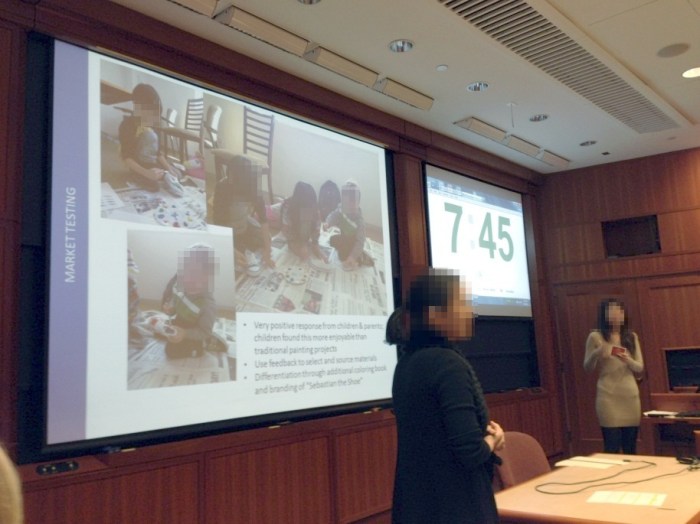
All of the startups used tools of modern product development. Eric Reis, author of Lean Startup, is an Entrepreneur in Residence at Harvard and so the ideas of “MVP”, measuring the right things, and even the pivot are all front and center for the founders. Because of the markets and the feedback loop, a number of companies in Section C went through substantial pivots.
The companies also make use of all the platform tools we see today that are available to quickly create new companies: paypal, wepay, shopify, AWS, and more. Businesses requiring components source them from local manufacturers or online such as Alibaba. Plus the companies make use of local services such as Task Rabbit or Harvard Student Agencies in order to bootstrap any labor that might be required. Apps target widely used mobile platforms. Facebook, twitter, and Google were used for sourcing early testers and demand generation/awareness via tools such as SEO and keyword buys in addition to branding sites.
Also critical, is that all companies adhere to local and state laws for anything that involves safety, privacy, and more. HBS has a code of conduct and separate set of rules around how the companies can interact with the University Community. So yes, this is like real life!!
Each pitch must also leave time for investor questions. These can be pointed and often return back to the previous rounds of investment. The investors are not given unlimited funds and are also keeping “score” trying to maximize their own return. This is a full financial market simulation.
Here’s the ticker before the market opened based on the closing prices of the last round:

The Companies
Here’s a chance to try out a few of the companies and see the work – keep in mind this is work done in the past 10 weeks or so and almost all coding was done via outsourcing! Personally, I could not be more impressed with the progress and the ability for the companies to navigate the tricky waters of both developing a product and a business, all while learning and doing all their other class work!
View The Rental (ticker:VIEW, http://www.viewtherental.com/). View the Rental provides objective information about apartments and houses for rent in Boston or Cambridge via remote video chat for renters who are unable to view their rental in person. This product uses Skype to establish a live walk-through of the exact apartment you might be renting.
RescueMe (ticker:RSCU, http://rescuememedical.com/, also available at local retailers). Traveling for Spring Break? Don’t leave without RescueMe, the all-in-one travel meds (and essentials) pack!
My Friend Bert (ticker:BERT, http://www.myfriendbert.com/). MyFriendBert provides expert-planned, customized date itineraries tailored to your preferences, delivered right to your inbox within 24 hours.
LaunchPad (ticker:PREP, http://getlaunchpad.net). Looking for a job or an internship? LaunchPad gives you the answers you need to stand out in your job search. LaunchPad sets up a customized 1:1 conversation between a student looking for a job and someone in that field who can offer advice and feedback on the industry or approach to finding a position.
easybiodata (ticker:BIO, http://www.easybiodata.com). Targeted at singles of Indian background, easybiodata is a solution to matrimonial search. Creating, Sharing and Managing your Biodata has never been easier with easybiodata.com whether you are the parent or extended family member helping the matrimonial search. EasyBiodata.com helps you spend less time sending emails so you can spend more time finding the perfect candidate. (Note: showing the global nature of the typical HBS team, this team was made up of students from 6 different countries: USA, Japan, Haiti, Slovak Republic, Kenya, and India).
Dinner Rally (ticker: RLLY, http://www.dinnerrally.com/). The best food from Harvard Square delivered straight to your door. Dinner Rally makes available food that is not normally delivered at a very affordable price, delivered straight to your door.
HuddleUp (ticker:HDDL, http://huddleevents.com). HuddleUp helps fans find the best place to watch their upcoming sports games at local bars. We know it can be tough, especially for fans of out-of-town teams, to find places to watch their games AND other fans to watch with.
Sepono (ticker: SPNP, http://sepono.co/). Sepono delivers on-demand nail and salon service booking. Tapping into over 1400 spas in the Boston area, Sepono makes it easy to find an appointment and obtain service.
SitCrawlWalk (ticker: BABY, http://www.sitcrawlwalk.com/). SitCrawlWalk We help parents discover the best products for their little ones at each stage of the baby’s life. Featuring reviews, curated and clutter free product offerings, and unbiased research sitcrawlwalk is a unique shopping approach tapping into the market for “social shopping” and affiliate sales.
PaintSteps (ticker:PNTS, http://www.paintsteps.com/). A creative shoe painting kit that lets your children’s creativity flourish and keep children occupied in a fun activity for hours. It includes a pair of children’s white canvas shoes, safe acrylic paint, palette and brushes, as well as an educational inspiration book. The inspiration book is designed by a professional illustrator and allows children to practice coloring on paper before painting the shoes.
stARTworks (ticker:ARTS, http://startworks.myshopify.com). Welcome to stARTworks brings the beautiful artwork of blossoming student and local artists to your doorstep! Here, you can view and purchase existing pieces, or create custom art from your own pictures and photos. Browse our artist pages or “What We Do” section to get started today! stARTworks is a socially conscious company that supports local and student artists.
Blinq (ticker:BLNQ, http://blinqpoll.com or https://www.facebook.com/pages/blinQ/534331106610301). blinQ is a mobile application that allows you to ask your friends for advice in real time before making time sensitive decisions.
PrepChef (ticker:CHEF, http://myprepchef.net). Simple, delicious recipes delivered right to your door! Free delivery includes portioned ingredients delivered to your door and simple step-by-step instructions. Teach yourself how to cook, host a dinner party, or just enjoy an evening of a self-cooked meal.
Party In A Box (ticker:PRTY, http://boxyourparty.com). One click theme party solution for those who love to party, like experimenting with new party themes and want great supplies and decorations delivered to their door. Feeling nostalgic for Backstreet Boys, slap bracelets and the Fresh Prince? Check out our 1990s box. Missing Ferris Bueller, track suits and bad hair? Our 1980s box has you covered. Your friends at Party-in-a-Box are also here for you on those special, once-in-a-year events: St. Patrick’s Day, Cinco de Mayo, Independence Day, the Kentucky Derby, etc.
Phew…those are just the companies from Section C. There are 9 other RC sections as well. You can see that many of these company ideas came about because of the unique problems faced by students leaving the workforce, relocating, traveling, meeting new people, living the life of students, and so on. Mother necessity is alive and well in FIELD3.
The stock market is still open and folks are still settling on their investments.
The next step will be the IPOs. But you can try these out now (note, some require you to be in Boston). And who knows, some of these might be the seeds of future companies as students continue to evolve the businesses.
Congratulations!
–Steven Sinofsky
A line to see someone is not cool, but is blocking progress
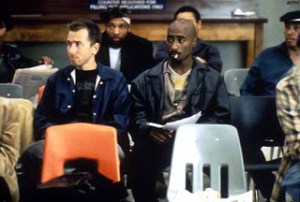 It might seem cool if there is a line outside someone’s door (or an inbox full of follow-ups in Outlook or a multi-week wait to “get on the schedule”). “Boy that person is really important” is what folks might say. In reality this bottleneck is a roadblock to progress and a sign of a team in need of change.
Most of the time we see managers with a line outside a door, but it can also be key leaders on a team of all sorts. Here are some tips to get out of the way and stop the gridlock.
Be sure to take the poll at the end of this post http://www.surveymonkey.com/s/QXR9WLZ. Feel free to use the comments to share your experience with a bottleneck on your team–there are folks out there probably experiencing something similar and benefit from your perspective. At the end of this post are the results from Career: Journey or Destination, which has some very interesting trends.
Why is there a line?
Managers or org leaders are busy. But so are the members of the team that work for the manager or depend on that leader. Unfortunately the way things go, too many folks end up as a bottleneck in getting things done. It might be a sign of importance or genuine workload, but it can also be a sign of a structural challenge. What are some of the reasons for a line?
- Approval. A manager asks to approve work before it can move forward.
- Feedback. Members of the team awaiting feedback from on proposed work.
- Decision. A leader is the decision maker in a situation.
On the face of it, each of these sound like the role of a manager (or leader, we’ll use them interchangeably in this post). The dictionary definition of a manager even supports this, “a person who has control or direction of an institution, business, etc., or of a part, division, or phase of it”. The operative notion is “in charge”.
There are several problems with this approach:
- Demotivating. If a job involves creativity (artistic, design, creation, problem solving, or a million other ways of being creative) then people who do those jobs well don’t generally do their best work under control. At an extreme, highly creative people are notorious for not wanting to be directed. The close cousin of demotivating is disempowering and very quickly creative people on the team lose the motivation to do great work and seek to get by with merely good work.
- Scale. A manager that operates a team as an “extension” of him/herself is not highly scalable. The line out the door represents the scale problem—it is trying to squeeze 64 bits through a 32 bit gate. There’s simply more work than can be done. The manager is overworked trying to do the work of the whole team, which is not sustainable.
- Slow. A manager that inserts him/herself in the middle of the flow of work causes the flow of work to slow down. The reaction time of the whole team no longer represents the capability of the team, but is limited by the ability of one person. Most folks are pretty frustrated by the roadblock to approval and then ultimately approval of the work as initially presented.
- Tactical. Those who operate in the middle of the work like this often justify their style as “adding strategic context”. This is often the exact opposite of what happens as the person is too busy to breath, take a step back, or to think long term because of the line out the door!
There are many justifications for why managers see these downsides as worth the risk. Managers feel like they have the experience to do better, know more, or maybe the team is new, understaffed, and so on. These are juicy rationalizations. Like parents doing homework and school projects for their kids, the short term seems reasonable but the long term becomes problematic.
Accountability
Beyond gridlock, the deep, long term problem created by a line outside a manager’s door is the transferal of accountability that takes place. Once the manager is in the middle of approving, providing feedback, or deciding then the very best case is that the manager is accountable for the outcome. Wait, you say that’s always the case, right?
A manager should be accountable when things don’t go well and stand up to claim the work of the team that wasn’t what it needed to be. When things go well, the manager should fade away and the team should shine. This isn’t some ideal. This is just the basics of teamwork and what needs to happen. That goes beyond management and is leadership.
But when a manager is in the middle of everything, members of the team have a tough time feeling a sense of pride of ownership. The further the results are from ideal, the less likely individuals feel responsible. It is simply too easy to point to places where each person surrendered accountability to management. And unfortunately, this opens up potential for the worst form of dysfunction which is a manager in the middle of everything stepping back and still assigning accountability to the team when things don’t go well, politics.
Ultimately, any healthy team is about everyone feeling an equal sense of accountability for the groups work and full accountability for their work. The role of the manager is to create a team and workflow that enables everyone to contribute and grow.
Rhythm of the team
The most important thing a manager can do to create a workflow for the team is to foster a continuous rhythm of work on the team. The world of modern products and service means things are in a state of change and adaptation all the time. Stores roll over promotions constantly. Web sites are always being programmed. Social networks provide a constant dialog to contribute to and respond to. Product feedback is available all the time. The team that is standing on a line is not just missing all the action, but is playing a losing strategy.
In his famous book, Flow: the psychology of optimal experience, Mihaly Csikszentmihalyi talks about how important it is to be engaged in self-controlled, goal-related, meaningful actions. That when you’re doing that you are in a flow and things are much better (“happier”) for everyone.
A flow on a business team or product team is about working towards a shared goal and doing so without the starts and stops that interrupt the flow. As a manager there are two simple things you can do:
- Never schedule your full day. As a rule of thumb, you should never schedule more than 50% of your day in structured meetings and other required activities. This leaves your day for “work” which is your work as a contributor (being a manager does not mean you stop having concrete deliverables!) and for keeping things from being blocked by you. If you have time during the day you can interact in an ad hoc manner with the team, find time to participate before things reach a bottleneck, and most importantly you have time to listen and learn. This is the number one crisis prevention tool at your disposal. The more time you have available the more time you can provide feedback when the time is right for action, as an example. You can provide feedback when a plan is a draft and do so casually and verbally, rather than the team “presenting” a draft in a meeting and you needing to react, or sending you an attachment that forms another line in your inbox, all usually too late for substantial feedback anyway.
- Stop approving and deciding. As heretical as this sounds, as an experiment a manager is encouraged to spend a month pushing back on the team when they ask for approval or a decision. Instead just ask them to decide. Ask them what would go wrong if they decided. Ask them if they are prepared for the implications of a decision either way. Ask them if they are comfortable owning and “defending” a decision (knowing you as the manager will still be supporting them anyway).
As a member of the team waiting in line, there’s an option for you too. Instead of asking for approval or the other side of the coin, acting now and worrying later, take the time to frame your choice in a clear and confident manner. Don’t be defensive, aggressive, or shift accountability, but simply say “Here’s what I’m suggesting as a course of action and what we’re prepared to deal with as the risk…” No choice is free of risk. The risky path is simply not being prepared for what could potentially go wrong.
The optimal team is one that is moving forward all the time and operating with a flow and rhythm. A line outside the door of a manager is a sign of a dysfunctional team. It isn’t hard to break the cycle. Give it a shot.
–Steven
The poll on this post is http://www.surveymonkey.com/s/QXR9WLZ. Let’s share thoughts on those lines outside doors.
Thanks to everyone who responded to our last survey on the “Defining your career path: journey or destination” post. We had an amazing response, with over 800 responses from around the world. Here are a few of the highlights:
- On average (mean), people have spent around 13 years in their career
- In those years, people have held 5.5 jobs or roles; or about 2 years per job/role
- About 26% claimed to be mostly “goal oriented”
- About 60% claimed to be mostly “experience oriented”
- 6% more sought to be “organization leaders” vs. “domain experts” (41% vs. 35%)
- And about 8% more sought to be “breadth leaders” vs. “field experts (42% vs. 34%)
- On average, we’re pretty satisfied with our careers: 3.7 on a 5-point scale
In this survey we had a nice “response variable” to consider: career satisfaction. If we agree that this is a goal we share, we can consider how the other “explanatory variables” contribute to overall career satisfaction:
- Those that claimed to be more “experience oriented” tended to have a higher level of career satisfaction vs. those that were more “goal oriented”; those that reported being “very satisfied” with their careers were >3x more likely to be “experience oriented”
- Those with longer careers tended to be more satisfied: both “career years” and “number of jobs” provided a fractional lift in the 5-point career satisfaction scale
- Pursuing a goal of “organizational leader” tended to provide more lift than “domain expert”
- And pursuing a experiences as a “field expert” tended to provide more lift to satisfaction than experiences as a “breadth leader” (though more consider themselves to be the latter)
- None of the models built in analyzing this data did a great job of explaining all of the variance in your responses; we are all different and find satisfaction in our careers in different ways
Bottom Line: There is no “silver bullet” which guarantees our career satisfaction; people are different and their satisfaction is driven by various factors, at different career stages. That said, as leaders, we generally tend to find satisfaction based on our experiences with other people (as org leaders, experts in our field, more time in our careers/more roles over time) over the specific goals or attained knowledge we encounter through our journey.
Thanks for your responses!
Cameron
Forking responsibly
 In a previous post, the topic of surviving legacy code was discussed. Browsers (or rendering engines within browsers) represent an interesting case of mission critical code as described in the post. A few folks noticed yesterday that Google has started a new rendering engine based on the WebKit project (“This was not an easy decision.” according to the post)
Relative to moving legacy code forward this raises some interesting product development challenges. This blog focuses on product development and the tradeoffs that invariably arise, and definitely not about being critical or analyzing choices made by others, as there are many other places to gain those perspectives. It is worth looking at actions through the lens of the product development discipline.
In this specific case there is an existing code base, legacy code, and a desire to move the code base forward. Expressed in the announcement, however briefly, is the architectural challenge faced by maintaining the multi-process architecture. Relative to the taxonomy from the previous post, this is a clear case of the challenges of moving an architecture forward. The challenge is pretty cut and dry.
The approach taken is one that looks very much a break in the evolution of the code base, a “fork” as described some. Also at work are efforts after forking to delete unused code, which is another technique for managing legacy code described previously. These are perfectly reasonable ways to move a code base forward, but also come with some challenges worth discussing.
What the fork?
(OK, I couldn’t resist that, or the title of this post).
Forking a code base is not just something one can do in the open source world, though there is somewhat of a special meaning there. It is a general practice applicable to any code base. In fact, robust source code control systems are deliberate in supporting forks because that is how one experiments on a code base, evolves it asynchronously, or just maintains distinct versions of the code.
A fork can be a temporary state, or sometimes called a branch when there are several and the intent to be temporary is clear. This is what one does to experiment on an alternate implementation or experiment on a new feature. After the experiment the changes are merged back in (or not) and the branch is closed off. Evolution of the code base moves forward as a singular effort.
A fork can also be permanent. This is where one can either reap significant benefits or introduce significant challenges, or both, in evolving the code. One can imagine forks that look like one of these two:


In the first case, the two paths stay in parallel. That’s an interesting approach. It is essentially saying that the code will do the same thing, but differently. In code one would use this approach if you wanted to maintain two variations of the same product but have different teams working on them. The differences between the two forks are known and planned. There’s a routine process for sharing changes as each of the branches evolve. In many ways, one could view the current state of webkit as this state since at no point is there a definitive version in use by every party. You might just call this type of fork a parallel evolution.
In the second case, the two paths diverge and diverge more over time. This too is an interesting approach. This type of fork is a one-time operation and then the evolution of each of the branches proceeds at the discretion of each development team. This approach says that the goals are no longer aligned and different paths need to be followed. There’s no limitation to sharing or merging changes, but this would happen opportunistically, not systematically. Comments from both resulting efforts of the WebKit fork reinforce the loosely coupled nature of the fork, including deleting the code unused by the respective forks along with a commitment to stay in communication.
For any given project, both of these could be appropriate. In terms of managing legacy code, both are making the statement that the existing code is no longer on the right evolutionary path—whether this is a technical, business, or engineering challenge.
Forking is a revolutionary change to a code base. It is sort of the punctuation in a punctuated equilibrium. It is an admission that the path the code and team were on is no longer working.
Maintaining functionality
The most critical choice to make when forking code is to have an understanding of where the functionality goes. In the taxonomy of managing legacy code, a fork is a reboot, not a recast.
From a legacy code perspective, the choice to fork is the same as a choice to rewrite. Forking is just an expedient way to get started. Rather than start from an empty source tree, one can visualize the fork as a tree copy of all the existing code to a new project and a fast start. This isn’t cheating. It can be a big asset or a big liability.
As an asset, if you start from all the same existing code then the chances of being compatible in terms of features, performance, and quality are pretty high. Early in the project your code base looks a lot like the one you started from. The differences are the ones you immediately introduce—deleting code you don’t think you need, rewriting some parts critical to you, refactoring/restructuring for better engineering. All of these are software changes and that means, definitionally, there will be regressions relative to the starting point in the neighborhood of 10%.
On the other hand, a fork done this way can also introduce a liability. If you start from the same code you were just using, then you bring with it all the architecture and features that you had before of course. The question becomes what were you going away from? What was it that could not be worked into the code base the way it stood? The answers to these questions can provide insights into the balance between maintaining exact functionality out of the gate and how fast and well you can evolve towards your new goals down the road.
In both cases, the functionality of the other fork is not standing still (though on a project where your team controls both forks, you can decide resource levels or amount of change tolerated in one or the other fork). The functionality of the two code bases will necessarily diverge just because everything would need to be done twice and the same way, which will prove to be impossible. In the case of WebKit it is worth noting that it was derived from a fork of KHTML, which has since had a challenging path (see http://en.wikipedia.org/wiki/WebKit).
Point of view required
As said, the process of rebooting via any means is a perfectly viable way to move forward in the face of legacy code challenges. What makes it possible to understand a decision to fork is having (or communicating) a point of view as to why a fork (a reboot, rewrite) is the right approach. A point of view simply says what problem is being solved and why the approach solves the problem in a robust manner.
To arrive at such a conclusion, the team needs to have an open and honest dialog about the direction things need to go and the capabilities of the team and existing code to move forward. Not everyone will ever agree—engineers are notoriously polarizing, or some might say “religious”, at moments like this. Those that wrote the code are certain they know how to move it forward. Those that did not write the code cannot imagine how it could possibly move forward. All want ways to code with minimal distraction from their highest priorities. Open minds, experimentation, and sharing of data are the tools for the team to use to work (and work it is) to a shared approach for the fork to work.
If the team chooses a reboot the critical information to articulate is the point of view of “why”. In other words, what are assumptions about the existing code are no longer valid in some new direction or strategy. Just as critically are the new bets or new assumptions that will drive decision making.
This is not a story for the outside world, but is critical to the successful engineering of the code. You really need to know what is different—and that needs to map to very clear choices where one set of assumptions leads to one implementation and another set of assumptions leads to very different choices. Open source turns this engineering dialog into an externally visible dialog between engineers.
Every successful fork is one that has a very clear set of assumptions that are different from the original code base.
If you don’t have a different set of assumptions that are so clearly different to the developers doing the work, then the chances are you will just be forked and not really drive a distinct evolutionary path in terms of innovation.
Knowing this point of view – what are the pillars driving a change in code evolution – turns into the story that will get told when the next product releases. This story will not only need to explain what is new, but ultimately as a matter of engineering, will need to explain to all parties why some things don’t quite work the way they do with the other fork, past or present at time of launch.
If you don’t have this point of view when you start the project, you’re not going to be able to create one later in the project. The “narrative” of a project gets created at the start. Only marketing and spin can create a story different than the one that really took place.
–Steven
Surviving legacy code
 In the software industry, legacy code is a phrase often used as a negative by engineers and pundits alike to describe the anchor around our collective necks that prevents software from moving forward in innovative ways. Perhaps the correlation between legacy and stagnation is not so obvious—consider that all code is legacy code as soon it is used by customers and clouds alike.
Legacy code is everywhere. Every bit of software we use, whether in an app on a phone, in the cloud, or installed on our PC is legacy code. Every bit of that code is being managed by a team of people who need to do something with it: improve it, maintain it, age it out. The process of evolving code over time is much more challenging than it appears on the face of it. Much like urban planning, it is easy to declare there should be mass transit, a new bridge, or a new exit, but figuring out how to design and engineer a solution free of disruptions or worse is extremely challenging. While one might think software is not concrete and steel, it has a structural integrity well beyond the obvious.
One of the more interesting aspects of Lean Startup for me is the notion of building products quickly and then reworking/pivoting/redoing them as you learn more from early adopters. This works extremely well for small code and customer bases. Once you have a larger code base or paying [sic] customers, there are limits to the ability to rewrite code or change your product, unless the number of new target customers greatly exceeds the number of existing customers. There exists a potential to slow or constrain innovation, or the reduced ability to serve as a platform for innovation. So while being free of any code certainly removes any engineering constraint, few projects are free of existing code for very long.
We tend to think of legacy code in the context of large commercial systems with support lifecycles and compatibility. In practice, lifting the hood of any software project in use by customers will have engineers talking about parts of the system that are a combination of mission critical and very hard to work near. Every project has code that might be deemed too hot to handle, or even radioactive. That’s legacy code.
This post looks at why code is legacy so quickly and some patterns. There’s no simple choice as to how to move forward but being deliberate and complete in how you do turns out to be the most helpful. Like so many things, this product development challenge is highly dependent on context and goals. Regardless, the topic of legacy is far more complex and nuanced than it might appear.
One person’s trash is another’s treasure
Whether legacy code is part of our rich heritage to be brought forward or part of historical anomalies to be erased from usage is often in the eye of the beholder. The newer or more broadly used some software is the more likely we are to see a representation of all views. The rapid pace of change across the marketplace, tools and techniques (computer science), and customer usage/needs only increases the velocity code moves to achieve legacy status.
In today’s environment, it is routine to talk about how business software is where the bulk of legacy code exists because businesses are slow to change. The inability to change quickly might not reflect a lack of desire, but merely prudence. A desire to improve upon existing investments rather than start over might be viewed as appropriately conservative as much as it might be stubborn and sticking to the past.
Business software systems are the heart and soul of what differentiates one company’s offering from another. These are the treasures of a company. Think about the difference between airlines or banks as you experience them. Different companies can have substantially different software experiences and yet all of them need to connect to enormously complex infrastructures. This infrastructure is a huge asset for the company and yet is also where changes need to happen. These systems were all created long before there was an idea of consumers directly accessing every aspect of the service. And yet with that access has come an increasing demand for even more features and more detailed access to the data and services we all know are there. We’re all quick to think of the software systems as trash when we can’t get the answer or service we want when we want it when we know it is in there somewhere.
Businesses also run systems that are essential but don’t necessarily differentiate one business from another or are just not customer facing. Running systems internally for a company to create and share information, communicate, or just run the “plumbing” of a company (accounting, payroll) are essential parts of what make a company a company. Defining, implementing, and maintaining these is exactly the same amount of work as the customer facing systems. These systems come with all the same burdens of security, operations, management, and more.
Only today, many of these seem to have off-the-shelf or cloud alternatives. Thus the choices made by a company to define the infrastructure of the company quickly become legacy when there appear to be so many alternatives entering the marketplace. To the company with a secure and manageable environment these systems are assets or even treasures. To the folks in a company “stuck” using something that seems more difficult or worse than something they can use on the web, these seem like crazy legacy systems, or maybe trash.
Companies, just as cities, need to adapt and change and move forward. There’s not an option to just keep running things as they are—you can’t grow or retain customers if your service doesn’t change but all the competitors around you do. So your treasure is also your legacy—everything that got you to where you are is also part of what needs to change.
Thinking about the systems consumers use quickly shows how much of the consumer world is burdened by existing software that fits this same mold—is the existing system trash or treasure? The answer is both and it just depends on who you ask or even how you ask.
Consumer systems today are primarily service-based. As such the pace of change is substantially different from the pace of change of the old packaged software world since changes only need take place at the service end without action by consumers. This rapid pace of change is almost always viewed as a positive, unless it isn’t.
The services we all use are amazing treasures once they become integral to our lives. Mail, social networking, entertaining, as well as our banking and travel tools are all treasures. They can make our lives easier and more fun. They are all amazing and complex software systems running at massive scale. To the companies that build and run these systems, they are the company treasures. They are the roads and infrastructure of a city.
If you want to start an uproar with a consumer service, then just change the user interface a bit. One day your customers (users, people) sign on and there’s a who moved my cheese moment. Unlike the packaged software world, no choice was made no time was set aside, rather just when you needed to check your mail, update status, or read some news everything is different. Generally the more acute your experience is the more wound up you get about the change. Unlike adding an extra button on an already crowded toolbar, a menu command at the end of a long menu, or just a new set of optional customizations, this in your face change is very rarely well-received.
Sometimes you don’t even need to change your service, but just say you’re going to shut it down and no longer offer it. Even if the service hasn’t changed in a long time or usage has not increased, all of a sudden that legacy system shows up as someone’s treasure. City planners trying to find new uses for a barely used public facility or rezone a parking lot often face incredible resistance from a small but stable customer population, even if the resources could be better used for a more people. That old abandoned building is declared an historic landmark, even if it goes unused. No matter how low the cost or how rich the provider, resources are finite.
The uproar that comes from changing consumer software represents customers clamoring for a maintaining the legacy. When faced with a change, it is not uncommon to see legacy viewed as a heritage and not the negatives usually associated with software legacy.
Often those most vocal about the topic have polarizing views on changes. Platforms might be fragmented and the desire is expressed to get everyone else to change their (browser, runtime, OS) to keep things modern and up to date—and this is expressed with extreme zest for change regardless of the cost to others. At the same time, things that impact a group of influentials or early adopters are most assailed when they do change in ways that run counter to convential wisdom.
Somewhere in this world where change and new are so highly valued and same represents old and legacy, is a real product development challenge. There are choices to be made in product development about the acceptance and tolerance of change, the need to change, and the ability to change. These are questions without obvious answers. While one person’s trash is another’s treasure makes sense in the abstract, what are we to do when it comes to moving systems forward.
Why legacy?
Let’s assume it is impossible to really say whether code is legacy to be replaced or rewritten or legacy to be preserved and cherished. We should stipulate this because it doesn’t really matter for two reasons:
- Assuming we’re not going to just shut down the system, it will change. Some people will like the change and other’s will not. One person’s treasure is another’s trash.
- Software engineering is a young and evolving field. Low-level architecture, user interaction, core technologies, tools, techniques, and even tastes will change, and change dramatically. What was once a treasured way to implement something will eventually become obsolete or plain dumb.
These two points define the notion that all existing code is legacy code. The job of product development is to figure out which existing code is a treasure and which is trash.
It is worth having a decision framework for what constitutes trash for your project. Part of every planning process should include a deliberate notion of what code is being treated as trash and what code is a treasure. The bigger the system, the more important it is to make sure everyone is on the same page in this regard. Inconsistencies in how change is handled can lead to frustrated or confused customers down the road.
Written with different assumptions
When a system is created, it is created with a whole host of assumptions. In fact, a huge base of assumptions are not even chosen deliberately at the start of a project. From the programming language to the platform to the basic architecture are chosen rather quickly at the start of a project. It turns out these put the system on a trajectory that will consistently reinforce assumptions.
We’ve seen detailed write-ups of the iOS platform and the evolution of apps relative to screen attributes. On the one hand developers coding to iOS know the specifics of the platform and can “lock” that assumption—a treasure for everyone. Then characteristics of screens potentially change (ppi, aspect ratio, size) and the question becomes whether preserving the fixed point is “supporting legacy” or “holding back innovation”.
While that is a specific example, consider broader assumptions such as bandwidth, cpu v. gpu capability, or even memory. An historic example would be how for the first ten years of PC software there was an extreme focus on reducing the amount of memory or disk storage used by software. Y2K itself was often blamed on people trying to save a few bits in memory or on disk. Structures were packed. Overlays were used. Data stored in binary on disk.
Then one day 32-bits, virtual memory and fast gigabyte disks become normal. For a short time there was a debate about sloppy software development (“why use 32 bits to represent 0-255?”) but by and large software developers were making different assumptions about what was the right starting point. Teams went through code systematically widening words, removing complexity of the 16 bit address space, and so on.
These changes came with a cost—it took time and effort to update applications for a new screen or revisit code for bit-packing assumptions. These seem easy and right in hindsight—these happen to be transparent to end-users. But to a broad audience these changes were work and the assumptions built into the code so innocently just became legacy.
It is easy for us to visualize changes in hardware driving these altered assumptions. But assumptions in the software environment are just as pervasive. Concepts ranging from changes in interaction widgets (commands to toolbars to context sensitive) to metaphors (desktop or panels) or even assumptions about what is expected behavior (spell checking). The latter is interesting because the assumption of having a local dictionary improve over time and support local custom dictionaries was state of the art. Today the expectation is that a web service is the best way to know how to spell something. That’s because you can assume connectivity and assume a rich backend.
When you start a new project, you might even take a step back and try to list all of the assumptions you’re making. Are you assuming screen size or aspect ratio, keyboard or touch, unlimited bandwidth, background processing, single user, credit cards, left to right typing, or more. It is worth noting that in the current climate of cross-platform development, the assumptions made on target platforms can differ quite a bit—what is easy or cheap on one platform might be impossible or costly on another. So your assumptions might be inherited from a target platform. It is rather incredible the long list of things one might assume at the start of a project and each of those translates into a potential roadblock into evolving your system.
Evolved views of well-architected
Software engineering is one of the youngest engineering disciplines. The whole of the discipline is a generation, particularly if you consider the micro-processor based view of the field. As defined by platforms, the notion of what constitutes a well-architected system is something that changes over time. This type of legacy challenge is one that influences engineers in terms of how they think about a project—this is the sort of evolution that makes it easy or difficult to deliver new features, but might not be visible to those using the system.
As an example, the evolution of where code should be executed in a system parallels the evolution of software engineering. From thin-client mainframes to rich-client tightly-coupled client/server to service-oriented architecture we see very different views of the most fundamental choice about where to put code. From modular to structured to object-oriented programming and more we see fundamentally different choices about how to structure code. From a focus on power, cores, and compute cycles to graphics, mobility, and battery life we see dramatic changes in what it means to be modern and well-architected.
The underlying architecture of a system affords developers a (far too) easy way to declare something as legacy code to be reworked. We all know a system written in COBOL is legacy. We all know if a system is a stateful client application to install in order to use the system it needs to be replaced.
When and how to make these choices is much more complex. These systems are usually critical to the operations of a business and it is often entirely possible (or even easier) to continue to deliver functionality on the existing system rather than attempt to replace the system entirely.
One of the most eye-opening examples of this for me is the description of the software developed for the Space Shuttle, which is a long-term project with complexity beyond what can even be recreated, see Architecture of the space shuttle primary avionics software system. The state of the art in software had moved very far, but the risks or impossibility of a modern and current architecture outweighed the benefits. We love to say that not every project is the space shuttle, but if you’re building the accounts system for a bank, then that software is as critical to the bank as avionics are to the shuttle. Mission critical is not only an absolute (“lives at stake”) but also relative in terms of importance to the organization.
A very smart manager of mine once said “given a choice, developers will always choose to rewrite the code that is there to make it better”. What he meant was that taken from a pure engineering approach, developers would gladly rewrite a body of code in order to bring it up to modern levels. But the downside of this is multi-faceted. There’s an opportunity cost. There’s often an inability to clearly understand the full scope of the existing system. And of course, basic software engineering says that 10% of all code changes will yield regressions. Simply reworking code because the definition of well-architected changed might not always be prudent. The flip side of being modern is sometimes the creation of second system syndrome.
Changed notion of extensibility
All software systems with staying power have some notion of extensibility or a platform. While this could be as obvious as an API for system services, it could also be an add-in model, a wire protocol, or even file formats. Once your system introduces extensibility it becomes a platform. Someone, internal or external, will take advantage of your extensibility in ways you probably didn’t envision. You’ve got an instant legacy, but this legacy is now a dependency to external partners critical to your success.
In fact, your efforts at delivering goodness have quickly transformed someone else’s efforts. What was a feature to you can become a mission critical effort to your customer. This is almost always viewed as big win—who doesn’t want people depending on your software in this way. In fact, it was probably the goal to get people to bet their efforts on your extensibility. Success.
Until you want to change it. Then your attempts to move your platform forward are constrained by what put in place in the first version. And often your first version was truly a first version. All the understanding you had of what people wanted to do and what they would do are now informed by real experience. While you can do tons of early testing and pre-release work, a true platform takes a long time before it becomes clear where efforts at tapping extensibility will be focused.
During this time you might even find that the availability of one bit of extensibility caused customers to look at other parts of your system and invent their own extensibility or even exploit the extensibility you provided in ways you did not intend.
In fact whole industries can spring up based on pushing the limits of your extensibility: browser toolbars, social network games, startup programs.
Elements of your software system that are “undocumented implementation” get used by many for good uses. Reversed engineered file formats, wire protocols, or just hooking things at a low level all provide valuable functionality for data transfer, management, or even making systems accessible to users with special needs.
Taking it a step further, extensibility itself (documented or implied) becomes the surface area to exploit for those wishing to do evil things to your system or to use your system as a vector for evil.
What was once a beautiful and useful treasure can quickly turn into trash or worse. Of course if bad things are happening then you can seek to remove the surface area exposed by your system and even then you can be surprised at the backlash that comes. A really interesting example of this is back in 1999 when the “Melissa” virus exploited the automation in Outlook. The reaction was to disable the automation which broke a broad class of add-ins and ended up questioning the very notion of extensibility and automation in email. We’ve seen similar dynamics with viral gaming in social networks where the benefits are clear but once exploited the extensibility can quickly become a liability. Melissa was not a security hole at the time, but since then the notion of extensibility has been redefined and so systems with or utilizing such extensibility get viewed as legacy systems that need to be thought through.
Used differently
While a system is being developed, there are scenarios and workflows that define the overall experience. Even with the best possible foresight, it is well-established that there is a high error rate in determining how a system will be used in the real world. Some of these errors are fairly gross but many are more nuanced, and depend on the context of usage. The more general purpose a system is the more likely it is to find the usage of a system to be substantially different from what it was designed to do. Conversely, the more task-oriented a system is the more likely it is to quickly see the mistakes or sub-optimal choices that got made.
Usage quickly gets to assumptions built into the system. List boxes designed to hold 100 names work well unless everyone has 1000 names in their lists. Systems designed for high latency networks behave differently when everyone has broadband. And while your web site might be great on a 15” laptop, one day you might find more people accessing it from a mobile browser with touch. These represent the rug being pulled out from under your usage assumptions. Your system implementation became legacy while people are just using it because they used it differently than you assumed.
At the same time, your views evolve on where you might want to take the system or experience. You might see new ways of input based on innovative technologies, new ways of organizing the functionality based on usage or increase in feature scope, or whole new features that change the flow of your system. These step-function changes are based on your role as designer of a system and evolving it to new usage scenarios.
Your view at the time when designing the changes is that you’re moving from the legacy system. Your customers think of the system as treasure. You view your change as the new treasure. Will your customers think of them as treasure or trash?
In these cases the legacy is visible and immediately runs into the risks of alienating those using your system. Changes will be dissected and debated among the core users (even for an internal system—ask the finance team how they like the new invoicing system, for example). Among breadth users the change will be just that, a change. Is the change a lot better or just a lot different? In your eyes or customer’s eyes? Are all customers the same?
We’re all familiar with the uproar that happens when user interface changes. Starting from the version upgrades of DOS classics like dBase or 1-2-3 through the most recent changes to web-based email search, or social networking, changing the user experience of existing systems to reflect new capabilities or usage is easily the most complex transformation existing, aka legacy, code must endure.
Approaches
If you waded through the above examples of what might make existing code legacy code you might be wondering what in the world you can do? As you’ve come to expect from this blog, there’s no easy answer because the dynamics of product development are complex and the choices dependent upon more variables than you can “compute”. Product development is a system of linear equations with more variables than equations.
The most courageous efforts of software professionals involve moving systems forward. While starting with a clean slate is often viewed as brave and creative, the reality is that it takes a ton of bravery and creativity to decide how to evolve a system. Even the newest web service quickly becomes an enormous challenge to change—the combination of engineering complexities and potential for choosing “wrong” are enough to overwhelm any engineer. Anyone can just keep something running, but keeping something running while moving it to new and broader uses defines the excitement of product development.
Once you have a software system in place with customers/users, and you want to change some existing functionality there are a few options you can choose from.
- Remove code. Sometimes the legacy code can just be removed. The code represents functionality that should no longer be part of your system. Keeping in mind that almost no system has something totally unused, you’re going to run into speed bumps and resistance. While it is often easy to think of removing a feature, chances are there are architectural dependencies throughout a large system that depend on not just the feature but how it is implemented. Often the cost of keeping an implementation around is much lower than the perceived benefit from not having it. There’s an opportunity to make sure that the local desire to have fewer old lines of code to worry about is not trumping a global desire to maintain stability in the overall development process. On the other hand, there can be a high cost or impossibility to keeping the old code around. The code might not meet modern standards for privacy or security, even though it is not executed it exposes surface area that could be executed, for example.
- Run side by side. The most common refrain for any user-interface changes to existing code is to leave both implementations running and just allow a compatibility mode or switch to return to the old way of running. Because the view is that leaving around code is usually not so high cost it is often the case that those on the outside of a project view it as relatively low cost to leave old code paths around. As easy as this sounds, the old code path still has operational complexities (in the case of a service) and/or test matrix complexities that have real costs even if there is no runtime cost to those not accessing it (code not used doesn’t take up memory or drain power). The desire most web developers have to stop supporting older browsers is essentially this argument—keeping around the existing code is more trouble than it might be worth. Side by side is almost never a practical engineering alternative. From a customer point of view it seems attractive except inevitably the question becomes “how long can I keep running things the old way”. Something claimed to be a transition quickly turns into a permanent fixture. Sometimes that temporary ramp the urban planners put in becomes pretty popular. There’s a fun Harvard Business School case on the design of the Office Ribbon ($) that folks might enjoy since it tees up this very question.
- Rewrite underneath. When there are changes in architectural assumptions one approach is to just replumb the system. Developers love this approach. It is also enormously difficult. Implicit in taking this approach is that the rest of the system “above” will function properly in the face of a changed implementation underneath or that there is an obvious match from one generation of plumbing to another. While we all know good systems have abstractions and well-designed interfaces, these depend on characteristics of the underlying architecture. An example of this is what happens when you take advantage of a great architecture like file i/o and then change dramatically the characteristics of the system by using SSDs. While you want everything to just be faster, we know that the whole system depended on the latency and responsiveness of systems that operated an order of magnitude slower. It just isn’t as simple as rewriting—the changes will ripple throughout the system.
- Stage introduction. Given the complexities of both engineering and rolling out a change to customers, often a favored approach is the staged rollout. In this approach the changes are integrated over time through a series of more palatable changes. Perhaps there are architectural changes done first or perhaps some amount of existing functionality is maintained initially. Ironically, this brings us back to the implication that most businesses are the ones slow to change and have the most legacy. In fact, businesses most often employ the staged rollout of system changes. This seems to be the most practical. It doesn’t have the drama of a disruptive change or the apparent smoothness of a compatibility mode, and it does take longer.
Taking these as potential paths to manage transitions of existing code, one might get discouraged. It might even be that it seems like the only answer is to start over. When thinking through all the complexities of evolving a system, starting over, or rebooting, becomes appealing very quickly.
Dilemma of rebooting
Rebooting a system has a great appeal when faced with a complex system that is hard to manage, was architected for a different era, and is loaded with dated assumptions.
This is even more appealing when you consider that the disruption going on in the marketplace that is driving the need for a whole new approach is likely being led by a new competitor that has no existing customers or legacy. This challenge gets to the very heart of the innovator’s dilemma (or disruptive technologies). How can you respond when you’ve got a boat anchor of code?
Sometimes you can call this a treasure or an asset. Often you call them customers.
It is very easy to say you want to rewrite a system. The biggest challenge is in figuring out if you mean literally rewrite it or simply recast it. A rewrite implies that you will carry forth everything you previously had but somehow improved along the dimension driving the need to rework the system. This is impossibly hard. In fact it is almost impossible to name a total rewrite that worked without some major disruption, a big bet, and some sort of transition plan that was itself a major effort.
The dilemma in rewriting the system is the amount of work that goes into the transition. Most systems are not documented or characterized well-enough to even know if you have completely and satisfactorily rewritten it. The implications for releasing a system that you believe is functionally equivalent but turns out not to be are significant in terms if mismatched customer expectations. Even small parts of a system can be enormously complex to rewrite in the sense of bringing forward all existing functionality.
On the other hand, if you have a new product that recasts the old one, but along the lines of different assumptions or different characteristics then it is possible to set expectations correctly while you have time to complete the equivalent of a rewrite or while customers get used to what is missing. There are many challenges that come from implementing this approach as it is effectively a side-by-side implementation but for the entire product, not just part of the code.
Of course an alternative is just an entirely new product that is positioned to do different things well, even if it does some of the existing product. Again, this simply restates the innovator’s dilemma argument. The only difference is that you employ this for your own system.
The biggest frustration software folks have with the “build a new system that doesn’t quite do everything the old one did” is the immediate realization of what is missing. From mail clients to word processors to development tools and more, anything that comes along that is entirely new and modern is immediately compared to the status quo. This is enormously frustrating because of course as software people we are familiar with what is missing, just as we’re familiar with finite time and resources. It is even more interesting when the comparison is made to a competitor who only does new things in a modern way. Solid state storage is fast, reliable, and more. How often it was described as expensive and low capacity relative to 1TB spindle drives. Which storage are we using today—on our phones, tablets, pcs, and even in the cloud? Cost came down and capacities increased.
It is also just as likely that featured deemed missing in some comparison to the existing technology leader will prove to be less interesting as time goes by. Early laptops that lacked wired networking or RGB ports were viewed quite negatively. Today these just aren’t critical. It isn’t that networking or projection aren’t critical, but these have been recast in terms of implementation. Today we think of Wi-Fi or 4G along with technologies for wireless screen sharing, rather than wires for connectivity. The underlying scenario didn’t change, just a radical transformation of how it gets done.
This leads to the reality that systems will converge. While you might think “oh we’ll never need that again” there’s a good chance that even a newly recast, or reimagined, view of a system will quickly need to pick up features and capabilities previously developed.
One person’s treasure is another’s trash.
–Steven Sinofsky
# # # # #
Defining your career path: journey or destination
 When asked about career path, some are quick to say things like “VP of … in 10 years” or “world’s expert in ….” Others might say “work in engineering, sales, management, and ….” Or maybe some would say “start 3 companies…IPO.” Taking a step back it is worth putting a framework around how to think about the experiences you build over time. Climbing the corporate or businesses ladders aren’t the only ways to think about careers, even though they occupy much of the energy devoted to talking about careers. Do you view your career as a journey or a destination?
Please be sure to see the three quick questions poll at the end of this post along with results from the last poll and take this post’s survey on career paths here.
For some, a professional career is a destination. From the very start, the goal is to achieve some level of proficiency or stature in your chosen field of work. The destination can be a role, a company, a level of achievement, or other specific and measurable goal.
For others, a professional career is a journey. From the very start, the goal is to experience work from a variety of perspectives in your field and adjacent field. The journey can be different companies or organizations within a big company, job types, geographies, or other varied aspects of your profession.
Destination and journey are different ways to look at career progression. While it is tempting to think of these as mutually exclusive or as a one-time choice, the reality is (as you can expect) a little less clear. Even so, you want to know not just the next step but the reasons behind next steps and how they contribute to a career path.
Destination
Many start careers with a goal of working their way “up” the chain. Going to manager, to general manager or director, to vice president, and more (gaining rank, earning tenure, making partner, etc.) defines progress. This might be exactly right for you. Setting your sights on specific and measurable milestones fits with how many view career progression.
Progression up the corporate ladder is not the only way to about your destination. In planning your next steps, one might consider two views of a destination-oriented path:
- Org leader. As an org leader you follow the path of moving “up”. While your path might involve moving laterally at times, you focus on meeting the objectives as defined by the organization for what skills and experiences enable you to move through the milestones of management.
- Domain expert. As a domain expert you follow the path of being the leader in your area in your company. For many technologists, this is ultimately where the highest satisfaction comes from. You know the ins and outs of a technology, system, or product better than anyone. You do this through years of experience and effort.
Focusing on your destination is not for everyone. This is not just a statement of skills that not everyone might have, but time and place play a role in achieving this type of goal. In most large organizations there is a fraction of the total team at “top” positions. For every VP there might be 100 or even 1000 other employees. Similarly, for every top domain expert, there may be 100 or 1000 other employees not as far along in their domain knowledge.
A destination goal is a long term play and means that during your path you will have periods that feel like you are not moving up, but that should not stop you from moving forward. You might need to take a step left or right sometimes to keep moving up. Most of all, never think that for you to move up, someone needs to move down. Most of the time with a destination oriented career your next steps are visible to you and the organization, and patience and timing play important parts of progression.
When you are set on a destination you also want to be prepared to manage through changes in the landscape.
As an org leader you are ultimately accountable for large projects or budgets, and the people that deliver on those commitments. Sometimes things don’t go as hoped and as an org leader you have to step up and accept responsibility. These become the key learning moments in your career progression.
As a domain expert, technologies change and paradigms change. The long-term domain experts are expert not in the specifics but in the solutions. As an amazing programmer you want to reinvent yourself as new languages and tools emerge. Leading the team through these discontinuities are the key learning moments in your career progression.
Journey
Many people start their careers knowing that the world is a big place waiting to be explored. They see the world through the lens of an adventurer or explorer. Going thoughtfully from one role to another or one organization to another fills your expectations of progressing through your career, or life. Setting your sites on a collection of experiences that you wish to have is the measurable way of managing your career.
Variety is not easy to measure and there is a fine line between variety and job-hopping. If the journey is your goal you want to have a clear understanding of how you intend to assemble a collection of experiences. You will move thoughtfully through these experiences and time your moves based on achieving some level of proficiency, satisfaction, and success.
In planning your journey, you might consider two views of a journey-oriented career path:
- Breadth leader. With breadth leader, you aim to have very different roles over time. You might choose to move between sales, marketing, business, or development in a product area you know and love. You might choose to move to different parts of the world to experience sales and marketing with a local flavor. You might choose to work on a variety of products within a large organization. You might even move from company to company. All of these broaden your experiences, and if you’re focused on the journey you will meet different people, learn from different perspectives, and experience your career from a variety of vantage points, absorbing these along the way as you grow and mature. Along the way you will be in a position to lead more as you gain experiences.
- Field expert. As a field expert, you collect experiences much like a domain expert but you establish breadth expertise by looking at your domain from a 360 degree view. You might be a technical expert with experience implementing such as system at different companies or you might have engineered similar systems from the ground up several times in different contexts. You seek to grow and progress through your career with depth experiences explored from different angles.
A journey career is not for everyone. You substitute the certainty of goals such as ladder levels or career stages, job titles, and pay grades with more substantial transitions. With a journey career your next steps are much more about what you seek out to achieve and less about what “comes next”. As with the explorers from another era, a journey career is driven from within and by your own desires.
On your journey, the transitions are key times you take action and plan on your next steps. Your deliberate next step makes all the difference when you reflect back on your path. Did your next step look “random” or did you have a clear rationale for choosing what you did? Think about how you might explain your steps to someone looking at your resume/CV as you explore the step after the next one.
When you choose your next step, you need to be prepared for a lot of change. You will work for new people, work with new people, and have different processes. You will need to adapt and conform. Things you thought you knew might not be right in the new context. On the other hand you will meet all sorts of new people and experience new ways of approaching the problems and challenges of business. Down the road when you have to define a process for a group, you have all your experiences and contexts to draw from to avoid repeating mistakes you might have experienced.
With a breadth leader path you might feel like you really jumped in the deep end at one transition. You might feel like you made a big mistake, going to work in a far-away place for example. Stick with it. Live through it. Adapt and grow. You will become more valuable to the team as a whole when you can call upon the collected learning. These are the learning moments on your journey.
As a field expert, you might find yourself in a familiar domain but without the resources you became accustomed to at your last role. You might wish you could call on that trusted associate or allocate budget in a way you did before, but these are not available to you. You will need to blaze a new trail or creatively solve the problem using the experience you have but applied differently. Using your domain knowledge and experience in this new context is how you learn as a field expert.
Adapting
You might reach a stage in your career where you want to settle down after many a journey. You might similarly reach a stage where it is time to explore new domains, new organizations, or just different perspectives. In other words you might find a stage in your career where the other of journey or destination becomes your new goal. Resetting your approach can be part of the journey of life.
Of course both paths have room to grow your salary and responsibility. While destination roles have high visibility in terms of material benefits, most organizations strive to have material benefits available for a broad array of people and assignments.
Keeping in mind your path and where you see the moves in your career will help you to have much more informed discussions with your managers and mentors. As a manager (or mentor), helping the members of the team to see their own desires and wishes will assist in coaching them through transitions.
If there is one piece of advice that transcends the description of your path, it is that no matter where you intend to go, the most important thing is to be excellent at what you are currently doing. When you’re doing excellent work, you create alternatives for yourself and open doors to new opportunities and paths.
–Steven Sinofsky
Three quick questions poll by Cameron
In the “Being a Leader…” post we asked three questions about your manager’s behavior and your empowerment/productivity. We had a great response from this popular post, here is what we learned together:
- Over half of you (54%) report that your manager “asks me to solve vaguely defined problems”, while only 14% report that their manager “spells out expectations in detail”
- Nearly half (48%) said that their manager “mostly edits” when reviewing their work and 45% said their manager “adds works without taking work away”
- There is nearly a 10% difference in the % of managers that provide “feedback quickly”(43%) vs. managers that provide “thoughtful, thorough feedback” (34%)
Next, we wanted to look at the relationship between your managers’ traits and your level of productivity and empowerment, both of which you ranked on a scale of 1-5, where 1 is low and 5 is high. The results were interesting:
- Those of you with managers that “mostly edit” when reviewing your work were about a point lower on the empowerment scale
- Those of you with managers that provided “thoughtful, thorough feedback” were about a point higher on the empowerment scale, but on average a half point lower on the productive scale
- Similarly, those of you with managers that use “delegation as a way to give others authority to make decisions” are a half point higher on the empowerment scale, but a half point lower on the productive scale.
- Those of you who had managers that “add work without taking work away” have a half point higher productivity
Bottom line: A consistent theme was that quality and quantity can be a trade-off, in leadership and in our deliverables. Often having both can prove difficult.
Disclaimer: As a caveat, it’s worth noting the subjective nature of these questions, and the potential bias of people taking this survey—those who likely have an interest in being an effective leader themselves.
Take this post’s survey on career paths here. Results reported with the next post. Thank you!
–Cameron
Being a leader, not a micromanaging editor: 3 patterns to avoid
 As a manager, big company or small, the opportunities to lead are everywhere. Too often though we can fail to lead and fall into the trap of editing the work of others–critiquing, tweaking, or otherwise mucking with what is discussed or delivered, rather than stepping back and considering if we are truly improving on the work or just imprinting upon the work, or if we are empowering or micromanaging.
Please don’t forget to try the new poll for this post here.
Every manager faces a constant struggle as the work expands and time shrinks—it seems faster to just say “the answer” rather than let “discovery” happen organically. Finding this balance and challenging ourselves to lead not edit is difficult but key to the long term strength of the team and ability to scale as a manager.
The challenge gets to the core responsibilities of management. Management, at every level, is about the effort to frame challenges, define end states, and allocate resources to navigate between them. If the work requires smart, talented, creative people, then more than anything you want to enable folks on the team to create. When people create, they want to show off their creation and keep creating more. Redoing, reworking, and revisiting can not only drain resources and energy, but sap creative people of their desire to create.
Micromanaging by editing
Most would probably agree that the easiest and most damming insult directed at a manager is the dreaded label micromanager.
Looking beyond the rhetoric, the term editor does more to explain the dynamic. Editing the work of those you manage disempowers the team, removes accountability, and in general reduces motivation. Editing the work of others is easy—it seems like anyone can change the UX, add a feature, rewrite some text, or tweak a slide. The creative effort is coming up with the work in the first place from a blank sheet, so to speak. Of course there is a role for editing (which itself is a noble profession), but in the complex works of product development there is a great deal of context. In reality most everything follows an iceberg principle, with far more than meets the eye—the complexities and realities that came to light during creation might not always be visible once the work is packaged up for management.
For a variety of reasons theorized in this Wikipedia entry on micromanagement, managers might resort to an excessive focus on details or dive into details arbitrarily. A common element is the manager taking the work of a team member as a starting point and substituting a flawed process of editing for what could be helpful, insightful, and valued interactions more defined by proper feedback or coaching.
From the perspective of the manager, there are a number of common patterns that arise and are indicative of management needing improvement.
- Receive and rework. You glance at your mobile and that updated specification shows up. While there is an expectation to read the spec and provide feedback, the sender was probably hoping for a job well done reply. Instead, your message back is a quick “did you think of X” or “I don’t like the way you say Y”. This gets even worse if the feedback is about the presentation of the information rather than the information. You hope to be improving the work but inadvertently spin up a PowerPoint or Excel workshop session. There might very well be mistakes or significant missteps in the work. Step back and deliver a clear and focused message on those and just skip the easy adds or tweaks. Suggestion: Make a simple rule for yourself like “never suggest a different format of a report” or “never add more work unless you also take away work” or “save feedback for the critical or strategic elements”.
- Delegate and tweak. When you delegate work to the member of the team, your job is to clearly frame success and describe the objectives. Delegation of work can be as simple as scrubbing the feature list or as complex as asking someone to take on a group-wide stretch assignment. No matter what the scale of delegation, getting out of the way after delegation is key. When the results are in, keep in mind not the results free of context but look at the results in the context of how you delegated the work. If you see mistakes or missteps, ask yourself if you were clear or your delegation caused the problems. Editing the work that ignores the context will tend to alienate folks as they keep thinking “would have been nice if you told me that up front”. Leading is actively taking responsibility for the lack of clarity and triaging the real marginal gain from tweaks at this later stage. Suggestion: Delegate challenges and define success, but don’t delegate the intermediate steps or detailed output, making it clear where creativity is expected.
- Fetch and edit. The best work for creative folks on the team is when the problem is big and the solution escapes everyone. In these cases, as a manager you don’t know the answer. That’s stressful for everyone. The way to increase the stress is to ask a member of the team to build or create an answer for “review” or for a list of options and recommendations. We all know how this process can really go haywire. When one potential solution to an unknown is offered, the next step is to go back and rework it with the new learning, or “no not that rock, a different rock”. We also know that with a big unknown and a list of n possible choices, after a brief dialog the next step is to pick option n+1. Suggestion: Asking creative people solve vaguely defined problems can be the most rewarding work of the team, so don’t drain the energy by thinking you will know the best answer when you see it, driving folks a bit loopy in the process.
Leadership is more than editing
These patterns and others all share a common result—the more you do them, the less creative and engaged your team will be over time. Each time your employ the tools of editor, rather than leader, you encourage people to stop creating and focus their energies on trying to predict your editorial reaction.
Leading is contributing data and experience–share your related experience and let the allegory and discovery do the work.
Leading is coaching–share your observations and offer pros and cons.
Leading is walking through the action/reaction decision tree—share the path, not just the destination.
Leading is reiterating accountability in so many cases.
Leading is knowing when the potential for learning and growing outweigh the risk of failure.
Leading is realizing there a few perfect answers and many great answers.
A goal of leading is to amplify your skills and experience while also growing new leaders. If you’re not giving people room to uncover their own way and ultimately solutions, then you’re creating a staff organization for you, not the next generation of leaders. As valuable as your experience is, don’t forget that the minutes or hour you spend editing compare to days and weeks often spent getting the work into a consumable format. The bigger the investment the more expert people are, even if they would benefit from coaching and experience.
Over time as you work to keep focused on leadership rather than editing, the team grows stronger and more self-reliant. Members of the team worry more about getting the best answers and work and less about wondering what management might be after. More work gets done. Members of the team are more empowered. This positive feedback loop continues to improve every aspect of the team.
–Steven
Three questions – insights from readers
In the post, Combining guessing and planning in product development, our resident big data researcher at Stanford proposed a few questions in order to reflect what those reading this blog have to say. Considering the overall clicks on posts, we’re seeing about 1-2% of readers participate in this “for entertainment purpose only” poll.
The poll on this new post can be found https://www.surveymonkey.com/s/VLHQSBJ, please participate and share your perspective.
Thanks to those of you that took a minute to answer our three questions. We saw a few noteworthy points from the results:
- Roughly half of you have had skip level meetings in the last six months.
- On average, you spend about one fifth of your project schedule planning.
- Over half of your plans are represented in your final products.
- The most popular planning tool was ‘Short Product Plans’ (61%) and the least popular was ‘Market Requirement Documents’ (31%), though a few of you also mentioned ‘customer stories’ and ‘prototypes’ as key planning tools.
Watch this space for results from the next survey!
–Cameron
Designing for scale and the tyranny of choice
 A post by Alex Limi, of Mozilla, Checkboxes that kill your product, is a fascinating read for anyone in the position to choose or implement the feature set of a software project. What is fascinating is of course the transparency and admission of the complexity of a modern software product. Along with this is a bit of a realization that those making the choices in a product are in some ways the cause of the challenge. Things are not quite so simple but are also not so difficult.
Simple
By now we are all familiar with the notion that the best designs are the simplest and most focused designs. Personified by Apple and in particular the words of Steve Jobs, so much of what makes good products is distilling them down to their essence. So much of what makes a good product line is only shipping the best products, the smallest set of products. So much has been written, including even in Smithsonian Magazine, about the love of simplicity that inspired and is expressed in the design language of Apple’s products based on a long history of design.
It is exceedingly difficult to argue against a simply designed product…so long as it does what you want or when it does more than competitive products.
In fact it is so difficult to argue against simplicity that this post won’t even attempt to. Let’s state emphatically that software should always do only what you need it to do, with the fewest number of steps, and least potential for errors due to complex choices and options.
On the other hand, good luck with that.
Anyone can look at any software product (or web site or hardware product) and remove things, decide things are not valuable to “anyone” or simply find a new way to prioritize, sort, or display functionality, content, capability. That’s really easy for anyone who can use a product to do. It is laudable when designers look back at their own products and reflect on the choices and rationale behind what, even with the best intentions, became undesired complexity, or paperclips.
The easiest type of simplicity is the kind that you place on a product after it is complete, hindsight is rather good when it comes to evaluating simplicity. This is simplicity by editing. You look at a product and point out the complexity and assume that it is there because someone made some poor assumptions, could not decide, didn’t understand customers, or a whole host of other reasons.
In fact, many choices in products that result in complexity are there because of deliberate choices with a known cost. Having options and checkboxes costs code and code costs time in development in testing. Adding buttons, hinges, or ports is expensive in materials, weight, or even battery life. Yet designers add these anyway. While data is not a substitute for strategy, looking at usage data and seeing that nearly every bit of surface area is executed, validates these choices (one could go through Limi’s post and reverse engineer the rationale and point to the reasons for baggage).
It is enormously difficult in practice to design something with simplicity in mind and express that in a product. It is an order of magnitude more difficult than that to maintain that over time as you hope for your asset to remain competitive and state of the art.
Difficult
Software is a unique product in that the cost of complexity is rarely carried by the customer. The marginal cost for more code is effectively zero. While you can have lots of options, you can also effectively hide them all and not present them front and center. While you can have extra code, it is entirely possible to keep it out of the execution path if you do the work. While you can inherit the combinatorics of a complex test matrix, you can use data and equivalence classing to make good engineering assumptions about what will really matter. Because of these mitigations, software is especially difficult to design simply and maintain in a simple state even if you accomplish a simple design once.
Here are seven reasons why simplicity in software design is incredibly difficult:
- New feature: enable/disable. You add a new feature to your product but are worried about the acceptance of the feature. Perhaps because your new feature is an incredibly innovative, but different, way to do something everyone does or perhaps because your new feature is based on a technology that you know has limits, you decide to add the checkbox. The easy thing to do is to just add a “do you want to use this” or the first time you see the feature in action you offer up an option to “keep doing this”. Of course you also have to maintain a place to undo that choice or offer it again. Play this out over the next release and evolution of the feature and you can see where this leads.
- New feature: can’t decide. You add a new feature and it clearly has a modality where some people think it should go left and others think it should go right (or scroll up or down, for example). So of course the easy thing to do is just add an option to allow people to choose. Play this out over time and imagine what happens if you decide to add a new way or you enhance one of left or right and you can see the combinatorics exploding right before your eyes.
- New way of doing something: enable compatibility. You add a new way to do something to your product as it evolves. Just to be safe you think it would be best to also have the old way of doing something stick around so you add back that option—of course software makes this easy because you just leave the old code around. But it isn’t so easy because you’re also adding new features that rely on the new foundation, so do you add those twice? Play this out as the new way of doing something evolves and people start to ask to evolve the old thing as well and the tyranny of options gets to you quickly.
- Remove feature: re-enable. As your product evolves you realize that a feature is no longer valid, useful, or comes at too high a cost (in complexity, data center operations, etc.) to maintain so you decide to remove it. Just to be safe you think it is a good idea (or customers require it to be a good idea) to leave in an option to re-enable that old feature. No big deal. Of course it is important to do this because telemetry shows that some people used the feature (no feature is used by zero people). Play this out and you have to ask yourself if you can ever really remove a feature, even if there is a material cost to the overall system for it to be there.
- Environmental choice: customize. Your product is used in a wide variety of environments from consumer to enterprise, desktop to mobile, managed to unmanaged, private network to internet, first time to experienced people, developers or end-users, and so on. The remarkable thing about software is the ability to dynamically adjust itself to a different usage style with the simple addition of some code and customization. The depth and breadth of this customization potential makes for a remarkably sticky and useful product so adding these customizations seems like a significant asset. Play this out over time and the combinatorics can overwhelm even the largest of IT administrators or test managers. Even if you do the work to design the use of these customizations so they are simple, the ability to evolve your designs over time with these constraints itself becomes a constraint—one that is likely highly valued by a set of customers.
- Personality: customize. You design a product with a personality that reflects the design language across every aspect of the product from user interface, documentation, packaging, web site, branding and logos, and more. Yet no matter what you do, a modern product should also reflect the personality of the owner or human using it. You see no problem offering some set of options for this (setting some background or color choices), but of course over time as your product evolves there is a constant demand for more of these. At some extremes you have requests to re-skin the entire product and yet no matter what you try to do it might never be enough customization. Play this out over time and you face challenges in evolving your own personality as it needs to incorporate customizations that might not make sense anymore. Personality starts to look a lot like features with code not just data.
- Competitive: just in case. The above design choices reflect complexity added during the development of the product. It is also possible to make choices that do not arise out of your own choices, but out of choices that come from responding to the market. Your main competitor takes a different approach to something you offer and markets the heck out of it. You get a lot of pressure to offer the feature that same way. The natural reaction is to put in a quick checkbox that renders some element of the UI your way as well as competitor’s way. You battle it out, but rest assured you have the objection-handler in place so sales and marketing don’t stress. Play this out and you can see how these quick checkboxes turn into features you have to design around over time.
Of course we all have our favorite illustrations of each of these. You can imagine these at a very gross level or even at a very fine level. The specifics don’t really matter because each of us can see immediately when we’re hitting up against a choice like this. Play the design choice out over the evolution of the product/feature and see where it goes.
It is important to see that at the time these are not dumb motivations. These are all legitimate product design approaches and tradeoffs. Another way people see simple is that while you’re designing it you know how it will definitely not appeal to a set of customers. You can take a bet on convincing people or you can be a bit safer. Product development is uncertain and only hindsight is 20/20. For every successful product that is simple, there are a lot of simplicity approaches that did not pan out over time. Minimal can be simple, or just a minimal number of customers.
What can you do?
Evolution
Software is definitely in a new era. The era of excess configurability or even infinite customization is behind us. The desire for secure, robust, long battery life along with incredible innovations in hardware that bring so many peripherals on board means that designers can finally look at the full package of software+hardware through a different lens.
If you draw an analogy to the evolution of the automobile, then one might see where the software world is today. And because we see software and hardware inextricably connected today, let’s say that this applies to the entire package of the device in your hand or bag.
In the golden era, as some would say, of automobiles it was the height of hip to know the insides of your car. A fun after school project for a guy in high school would be to head home, pop the hood on the Chevy, and tune the engine. Extra money earned on the side would go to custom parts, tools, and tweaking your wheels. You expressed yourself through your car.
Then along came the innovations in quality and reliability from car makers in the 80’s. They saw a different approach.
When I was 16 my father took me to look at cars. We stopped by the dealer and during the pitch he asked the salesman to pop open the hood. I am sure the look on my face was priceless. I had literally no idea what to look for or what to see. Turns out my father didn’t either. Electronic fuel injection, power steering, and a whole host of other things had replaced the analog cars he knew and loved (and currently drove). Times had changed.
I have not looked under the hood of a car since. My expectation of a car is that it just works. I don’t open the hood. I don’t service it myself. I don’t replace parts myself. I can adjust the seats, set the radio presets, and put an Om sticker on the back. I want the car’s design to express my personality, but I don’t want to spend my time and energy worrying if I broke the car doing so. Technology has advanced to the point where popping the hood on a car is no longer a hobby. The reliability of being able to drive a 2002 Prius for over 100,000 miles without worrying comes with fewer options and customizations, but I got a car that cost less to operate, took less time as an owner to maintain, and was safer in every way. Sold.
Today’s sealed Ultrabooks and tablets, app stores, and even signed drivers represent this evolution. Parts that done wear out, peripherals that you don’t need to tune or adjust at the software level, thin, light, robust, reliable. Sold.
Approach – Point of View
How can you approach this in the products you design? As you can imagine there is a balance. The balance is between your point of view and making sure you truly meet customer needs.
A point of view has to be one of the best tools of design A point of view is the reason for being, the essence, the very nature of a product. In a world where just about every product (but not all) is made of similar ingredients and solve problems that can kind-of, sort-of be solved in other ways, what distinguishes one product from another is a unique point of view that is followed through in the design.
A point of view says who the product is for and why. A point of view says the benefits of a product. A point of view says why this product is better, faster, and differentiated in the marketplace.
A point of view also guides you in deciding how to be simple. Simplicity comes from adhering to your point of view. If you have a clear point of view then simplicity follows from that. Is something consistent with your point of view? If so then it sounds like a candidate. If not, then why are you considering it? Is your point of view changing (it can, but be careful)?
But we don’t all have the luxury of declaring a point of view and sticking to it. You can share your point of view with customers, or potential customers. You can articulate your point of view to the market. You can also adapt and change. The market also adapts and changes.
That’s why product development is so exciting and interesting. The answers are not so simple and the journey is complex, even if the goal is product simplicity.
–Steven
PS: Interested in a Harvard Business teaching case study on this topic, then perhaps check out http://www.hbs.edu/faculty/Pages/item.aspx?num=34113 (Microsoft Office 2007). This is a paid link for which I receive no compensation.


 Learning by Shipping